メインコンテンツにスキップ
リペアコミュニティに参加 - アカウントの作成

TomTom GO 500 Battery Replacement

必要な工具と部品

  1. TomTom GO 500 Battery Replacement, TomTom GO 500 Opening the Device: 手順 1、 1の画像 1
    • Unscrew the two 3mm screws at the base of the device using the Torx T5 screwdriver.

    FixBotに聞いてみる

    コメントを追加

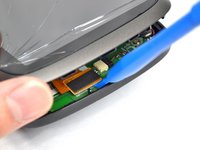
  2. TomTom GO 500 Battery Replacement: 手順 2、 2の画像 1 TomTom GO 500 Battery Replacement: 手順 2、 2の画像 2
    • Using the plastic opening tools, insert one opening tool into the gap between the screen casing and the motherboard casing. Then insert the other tool into one of the adjacent sides and slide it around the top.

    • There are 14 latches that need to be undone.

    • The latches break easily during the opening process so we recommend purchasing a new screen casing if they break.

    FixBotに聞いてみる

    コメントを追加

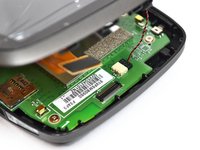
  3. TomTom GO 500 Battery Replacement: 手順 3、 1の画像 1
    • With the screen casing unlatched, locate the right side where the two connectors are.

    FixBotに聞いてみる

    コメントを追加

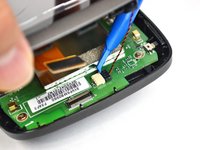
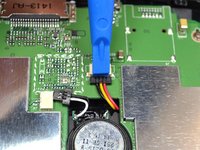
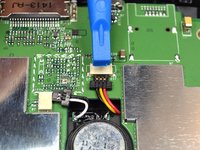
  4. TomTom GO 500 Battery Replacement: 手順 4、 3の画像 1 TomTom GO 500 Battery Replacement: 手順 4、 3の画像 2 TomTom GO 500 Battery Replacement: 手順 4、 3の画像 3
    • Unlatch the connectors using the plastic opening tool.

    • The orange rectangular connector may have come off in the process of removing the screen casing.

    FixBotに聞いてみる

    コメントを追加

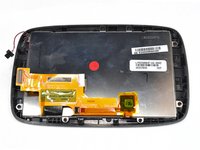
  5. TomTom GO 500 Battery Replacement: 手順 5、 2の画像 1 TomTom GO 500 Battery Replacement: 手順 5、 2の画像 2
    • Separate the screen casing from the motherboard casing.

    FixBotに聞いてみる

    コメントを追加

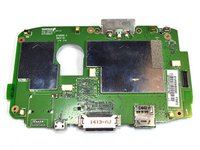
  6. TomTom GO 500 Battery Replacement, Motherboard: 手順 6、 1の画像 1
    • Unscrew the five 4mm screws using the Phillips #0 screwdriver.

    FixBotに聞いてみる

    コメントを追加

  7. TomTom GO 500 Battery Replacement: 手順 7、 2の画像 1 TomTom GO 500 Battery Replacement: 手順 7、 2の画像 2
    この手順で使用する道具:
    Tweezers
    $4.99
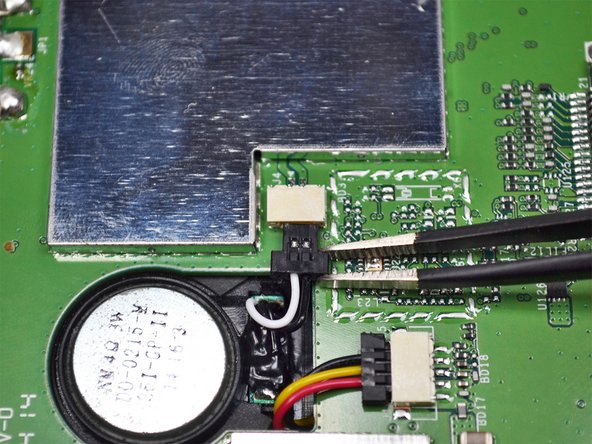
    • Unplug the connector shown near the center of the motherboard using the tweezers.

    FixBotに聞いてみる

    コメントを追加

  8. TomTom GO 500 Battery Replacement: 手順 8、 2の画像 1 TomTom GO 500 Battery Replacement: 手順 8、 2の画像 2
    • Unplug the second connector using the plastic opening tool.

    FixBotに聞いてみる

    コメントを追加

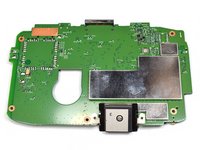
  9. TomTom GO 500 Battery Replacement: 手順 9、 2の画像 1 TomTom GO 500 Battery Replacement: 手順 9、 2の画像 2
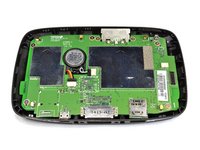
    • Remove the motherboard from the casing.

    FixBotに聞いてみる

    コメントを追加

  10. TomTom GO 500 Battery Replacement, Battery: 手順 10、 1の画像 1
    • After opening the device and removing the motherboard, you will see the battery attached to the frame.

    FixBotに聞いてみる

    コメントを追加

  11. TomTom GO 500 Battery Replacement: 手順 11、 2の画像 1 TomTom GO 500 Battery Replacement: 手順 11、 2の画像 2
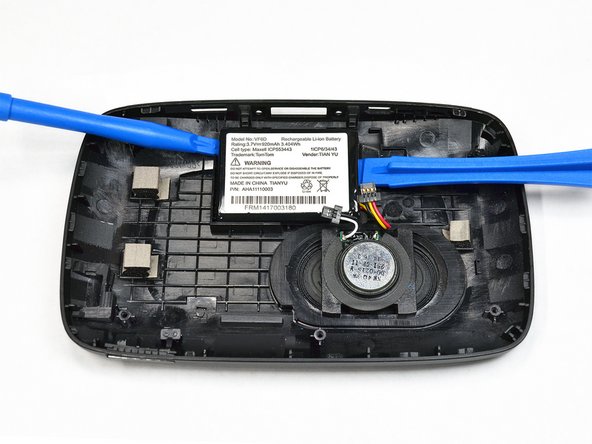
    • Use the plastic opening tools on both sides of the battery to carefully pry it off of the frame.

    • The battery attaches to the frame with double-sided tape so this should be fairly easy to remove.

    • In this image, a smaller plastic tool was used on the left side while a larger one was used on the right side.

    FixBotに聞いてみる

    コメントを追加

終わりに

To reassemble your device, follow these instructions in reverse order.

キャンセル: このガイドを終了できませんでした。

22 の人々がこのガイドを完成させました。

作成者

3人の作成者と共同で作成されました。

Oriana Hone

メンバー登録日: 09/22/16

369 ポイント

1ガイドが承認済み

チーム

UC Davis, Team 2-5, Oliver Fall 2016 UC Davis, Team 2-5, Oliver Fall 2016人のメンバー

UCD-OLIVER-F16S2G5

5 メンバー

9のガイドは作成済み

7件のガイドコメント

Very effective guide, easy to follow and good images too, thank you Mike

Mike Jones - 返信 共有

Most difficult part was opening the case, seemed to work best with the opening tool ends pointed down (screen up), levered the latches best.

Reassembling, the larger of the two connections that attach the screen to the motherboard case was fiddly to line up, it requires a bit of care and patience.

Thanks for these instructions.

Alan - 返信 共有

Danke, Oriana Hone (und 3 anderen Mitwirkenden), gute Anleitung.

Und ja, wie vorgewarnt, 4 der Plastik-Verriegelungen brachen leicht während des Öffnungsvorgangs. Jetzt muss ich wohl ein neues Bildschirmgehäuse finden... Oder genügen die verbleibenden 10?

vjrott - 返信 共有

Thanks, Oriana Hone (and 3 other contributors), good guide. Used it for GO 5000.

And yes, as forewarned, 4 of the plastic latches broke easily during the opening process. Now I guess I'll have to find a new screen casing... Or will the remaining suffice?

vjrott - 返信 共有

tip top - alles bestens erklärt. Geduld haben, vorsichtig sein,

Ich hatte den neuen Akku zusammen mit einem Set Spezialwerkzeug online bestellt; damit ging es wirklich super.

Ron Tyler - 返信 共有

コメントを追加

統計データ:

過去 24時間: 8

過去 7 日: 71

過去 30 日: 229

今までの合計 16,225