メインコンテンツにスキップ
リペアコミュニティに参加 - アカウントの作成

Tagital T10 Touch Screen Replacement

必要な工具と部品

  1. Tagital T10 Touch Screen Replacement, Touch Screen: 手順 1、 1の画像 1
    • Always make sure your device is completely powered off before performing repairs

    • Remove the two 4mm screws at the top of the device.

    • Set these aside and be careful not to lose them, as well as all other screws that you remove.

    FixBotに聞いてみる

    コメントを追加

  2. Tagital T10 Touch Screen Replacement: 手順 2、 1の画像 1
    • Carefully remove the back cover by using a plastic prying tool, moving all the way around the perimeter of the tablet.

    • Set the back cover aside

    • The speakers are attached to the inside back cover, and are connected by wires to the motherboard of the tablet. Carefully set the back cover aside so that you do not rip the wires free.

    FixBotに聞いてみる

    コメントを追加

  3. Tagital T10 Touch Screen Replacement: 手順 3、 1の画像 1
    • The display screen is the silver box that the battery and motherboard sit on. It sits snugly against the underside of the touch screen.

    • Remove all of the 4mm screws that attach the display screen to the back of the touch screen with brackets.

    FixBotに聞いてみる

    コメントを追加

  4. Tagital T10 Touch Screen Replacement: 手順 4、 2の画像 1 Tagital T10 Touch Screen Replacement: 手順 4、 2の画像 2
    • Remove all of the 4mm screws that attach the motherboard to the rest of the device.

    • One screw is located beneath the black tape that holds the rear-facing camera in place. Peel the tape up to access it.

    FixBotに聞いてみる

    コメントを追加

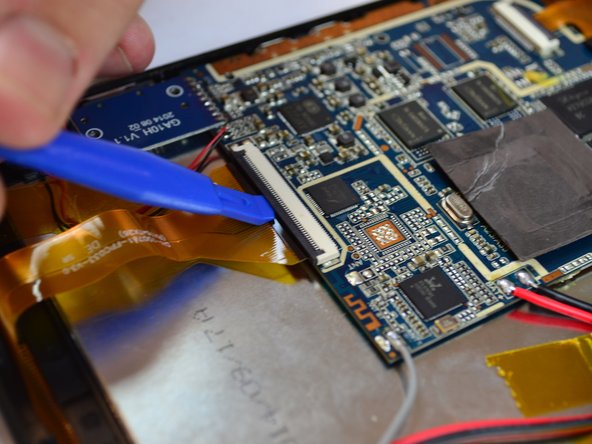
  5. Tagital T10 Touch Screen Replacement: 手順 5、 2の画像 1 Tagital T10 Touch Screen Replacement: 手順 5、 2の画像 2
    • Locate the 2 ZIF connectors.

    • Flip up the black tab to release the two filaments, so that they are no longer connected to the motherboard.

    FixBotに聞いてみる

    コメントを追加

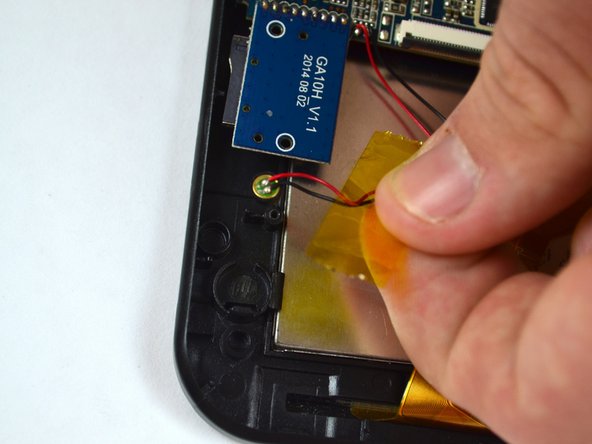
  6. Tagital T10 Touch Screen Replacement: 手順 6、 2の画像 1 Tagital T10 Touch Screen Replacement: 手順 6、 2の画像 2
    • Locate the notification light on the upper left corner of the device.

    • Gently pull on the wires to remove the light from its housing.

    FixBotに聞いてみる

    コメントを追加

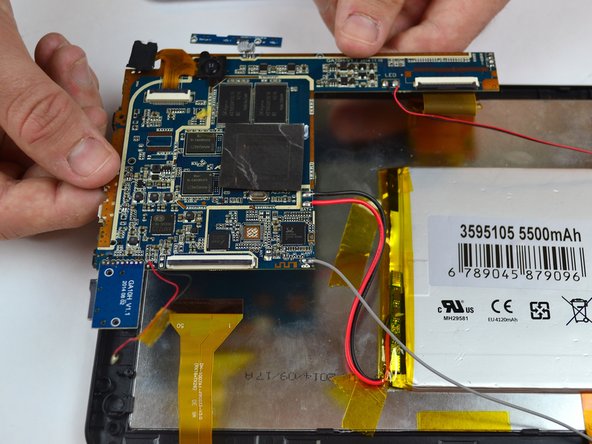
  7. Tagital T10 Touch Screen Replacement: 手順 7、 1の画像 1
    • Remove the motherboard from the back of the display screen.

    • Some wires are still attached to the device so carefully set it to the side

    FixBotに聞いてみる

    コメントを追加

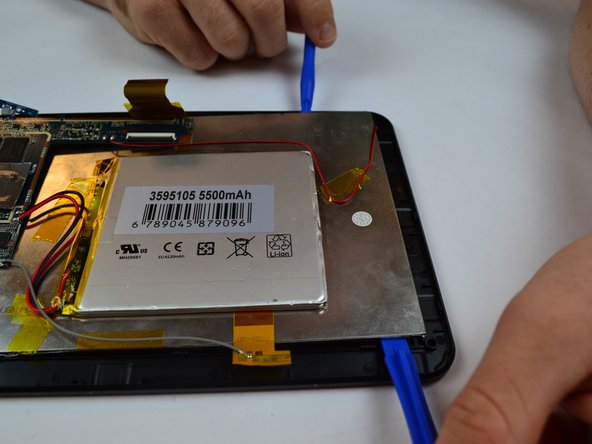
  8. Tagital T10 Touch Screen Replacement: 手順 8、 2の画像 1 Tagital T10 Touch Screen Replacement: 手順 8、 2の画像 2
    • Begin lifting the display screen out of its housing with a plastic prying tool, sliding it around the perimeter of the screen.

    • It may be helpful to use two prying tools at the same time.

    FixBotに聞いてみる

    コメントを追加

  9. Tagital T10 Touch Screen Replacement: 手順 9、 1の画像 1
    • Completely remove the display screen from the touchscreen.

    FixBotに聞いてみる

    コメントを追加

終わりに

To reassemble your device, follow these instructions in reverse order.

キャンセル: このガイドを終了できませんでした。

2 の人々がこのガイドを完成させました。

作成者

2人の作成者と共同で作成されました。

Jessalyn Aretz

メンバー登録日: 09/26/16

212 ポイント

1ガイドが承認済み

チーム

USF Tampa, Team 14-5, Eyestone Fall 2016 USF Tampa, Team 14-5, Eyestone Fall 2016人のメンバー

USFT-EYESTONE-F16S14G5

4 メンバー

10のガイドは作成済み

0件のガイドコメント

コメントを追加

統計データ:

過去 24時間: 1

過去 7 日: 9

過去 30 日: 33

今までの合計 1,717