はじめに
For this guide you will remove the back cover and battery cover in order to replace the battery.
必要な工具と部品
-
-
-
Remove the calculator's protective cover.
-
Place the calculator face down.
 FixBotに聞いてみる
-
-
-
Using a Phillips #1 screwdriver, remove the six 6mm screws from the back of the case and place them to the side.
-
Start from the notches on the top edge and use your fingers or a prying tool to carefully pry the back cover from the calculator.
-
-
-
-
-
-
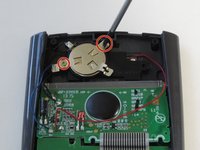
Use a Phillips #00 screwdriver to remove the two 7.5 mm screws holding the battery cover to the case.
-
Use your finger to move the battery cover to the side.
-
-
-
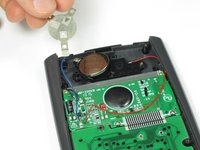
Use the flat side of a spudger to remove the battery by lifting the bottom edge.
-
-



To reassemble your device, follow these instructions in reverse order.
11 の人々がこのガイドを完成させました。

チーム

Cal Poly, Team 11-52, Amido Spring 2014 Cal Poly, Team 11-52, Amido Spring 2014人のメンバー
CPSU-AMIDO-S14S11G52
4 メンバー
25のガイドは作成済み
5件のガイドコメント
Interesting that the cr2032 battery is not rechargeable, so is the solar panel real? Or does it bypass the battery and use the solar panel in lighted situations?
frogman896 - 返信 共有
The guide should specify that the CR2032 needs to be rechargeable. They are readily available at a popular online shopping website. I was skeptical that the solar was real too, because of the frosted plastic placed over it. Based on the pictures in this teardown, and another video showing a red LED in the solar circuit, I conclude that the solar charging circuit is real.
Jacob Ertel - 返信 共有
The manual doesn't specify a rechargeable battery. It just says a CR2032 Lithium battery. Unless all such batteries are rechargeable? I guess I'll find out since I just replaced the battery in mine and it's an Energizer CR2032, but it doesn't appear to say rechargeable anywhere on the packaging or the battery itself. I guess if it kills my calculator, it had a good run....
EDIT: The original battery that I took out of the calculator doesn't say rechargeable on it either.
