メインコンテンツにスキップ
リペアコミュニティに参加 - アカウントの作成

SteelSeries Apex 64145 Key Replacement

必要な工具と部品

    1. SteelSeries Apex 64145 Key Replacement, Key: 手順 1、 1の画像 1
      • Unplug the keyboard from the computer.

      FixBotに聞いてみる

      コメントを追加

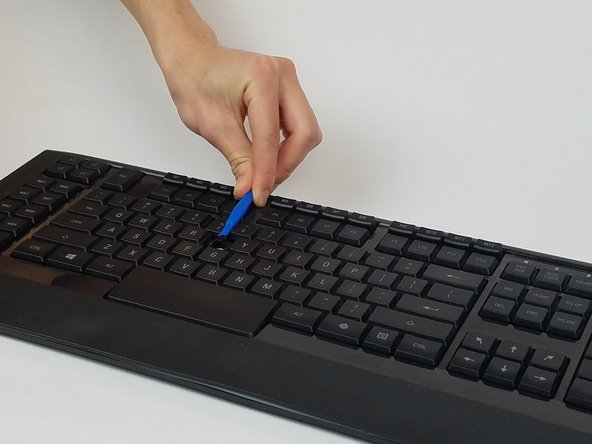
    2. SteelSeries Apex 64145 Key Replacement: 手順 2、 1の画像 1
      • Insert the plastic opening tool underneath the edge of the key.

      FixBotに聞いてみる

      コメントを追加

    3. SteelSeries Apex 64145 Key Replacement: 手順 3、 2の画像 1 SteelSeries Apex 64145 Key Replacement: 手順 3、 2の画像 2
      • Gently pry the damaged key with the plastic opening tool at an upward angle.

      FixBotに聞いてみる

      コメントを追加

    4. SteelSeries Apex 64145 Key Replacement: 手順 4、 1の画像 1
      • If replacing, prepare your new key for insertion.

      • If key is dirty, wash the key with room temperature water and dry off the key with a towel.

      FixBotに聞いてみる

      コメントを追加

    5. SteelSeries Apex 64145 Key Replacement: 手順 5、 1の画像 1
      • Gently push the key back into the slot until you hear a click.

      FixBotに聞いてみる

      コメントを追加

終わりに

To reassemble your device, follow these instructions in reverse order.

キャンセル: このガイドを終了できませんでした。

ある他の人がこのガイドを完成しました。

作成者

2人の作成者と共同で作成されました。

Zwe Phone Shein

メンバー登録日: 02/28/17

559 ポイント

5のガイドは作成済み

チーム

USF Tampa, Team S1-G1, Nance Spring 2017 USF Tampa, Team S1-G1, Nance Spring 2017人のメンバー

USFT-NANCE-S17S1G1

4 メンバー

15のガイドは作成済み

1件のガイドコメント

very easy… if u can find new keycap. those are customs not sold

T T - 返信 共有

コメントを追加

統計データ:

過去 24時間: 0

過去 7 日: 7

過去 30 日: 46

今までの合計 6,470