メインコンテンツにスキップ
リペアコミュニティに参加 - アカウントの作成

Sony Cyber-Shot DSC-W830 Button Board Replacement

必要な工具と部品

    1. Sony Cyber-Shot DSC-W830 Button Board Replacement, Battery: 手順 1、 1の画像 1
      • Slide the lock at the bottom of the camera to "Open".

      • The door to the battery pack is spring loaded.

      FixBotに聞いてみる
      コメントを追加

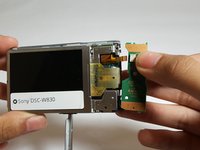
    2. Sony Cyber-Shot DSC-W830 Button Board Replacement: 手順 2、 1の画像 1
      • Slide the blue clip up and away from the battery.

      FixBotに聞いてみる
      コメントを追加

    3. Sony Cyber-Shot DSC-W830 Button Board Replacement: 手順 3、 1の画像 1
      • Remove the battery.

      FixBotに聞いてみる

      コメントを追加

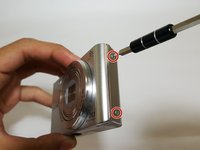
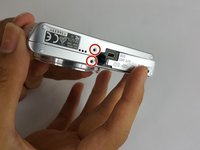
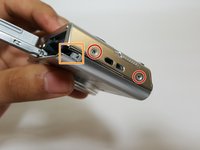
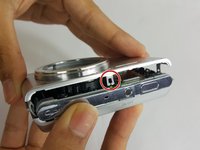
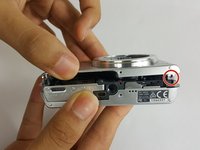
    1. Sony Cyber-Shot DSC-W830 Button Board Replacement, Front and Back Panel: 手順 4、 3の画像 1 Sony Cyber-Shot DSC-W830 Button Board Replacement, Front and Back Panel: 手順 4、 3の画像 2 Sony Cyber-Shot DSC-W830 Button Board Replacement, Front and Back Panel: 手順 4、 3の画像 3
      • Remove the six 3.5mm Phillips #000 screws.

      • Rotate the lock away from the camera.

      FixBotに聞いてみる

      コメントを追加

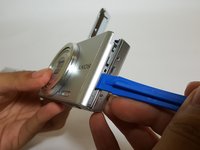
    2. Sony Cyber-Shot DSC-W830 Button Board Replacement: 手順 5、 3の画像 1 Sony Cyber-Shot DSC-W830 Button Board Replacement: 手順 5、 3の画像 2 Sony Cyber-Shot DSC-W830 Button Board Replacement: 手順 5、 3の画像 3
      • Pry the device open with the plastic opening tool.

      • There are two clips that help prevent the front panel from separating.

      FixBotに聞いてみる

      コメントを追加

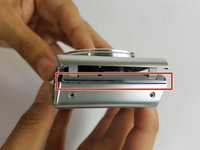
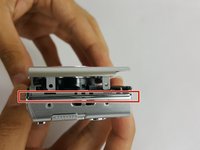
    3. Sony Cyber-Shot DSC-W830 Button Board Replacement: 手順 6、 3の画像 1 Sony Cyber-Shot DSC-W830 Button Board Replacement: 手順 6、 3の画像 2 Sony Cyber-Shot DSC-W830 Button Board Replacement: 手順 6、 3の画像 3
      • Remove the two plastic spacers between the front and the back panels.

      • The spacers may fall out when removing the panels.

      • Carefully remove the back panel.

      FixBotに聞いてみる

      コメントを追加

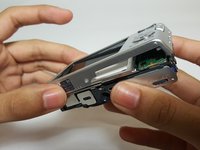
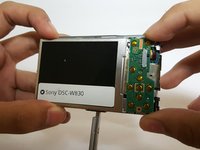
    1. Sony Cyber-Shot DSC-W830 Button Board Replacement, Button Board: 手順 7、 2の画像 1 Sony Cyber-Shot DSC-W830 Button Board Replacement, Button Board: 手順 7、 2の画像 2
      • Gently release the button board from the clips.

      • Be careful when lifting the button board; the ribbon cable will still be attached.

      FixBotに聞いてみる

      コメントを追加

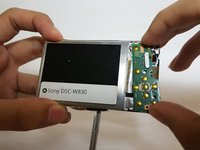
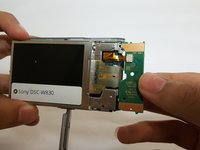
    2. Sony Cyber-Shot DSC-W830 Button Board Replacement: 手順 8、 2の画像 1 Sony Cyber-Shot DSC-W830 Button Board Replacement: 手順 8、 2の画像 2
      • Disconnect the no-fuss ribbon cable by gently pulling it out of the button board.

      FixBotに聞いてみる

      コメントを追加

終わりに

To reassemble your device, follow these instructions in reverse order.

キャンセル: このガイドを終了できませんでした。

ある他の人がこのガイドを完成しました。

作成者

4人の作成者と共同で作成されました。

Addyson Salalila

メンバー登録日: 09/15/16

316 ポイント

2のガイドは作成済み

チーム

USF Tampa, Team 17-1, Blackwell Fall 2016 USF Tampa, Team 17-1, Blackwell Fall 2016人のメンバー

USFT-BLACKWELL-F16S17G1

4 メンバー

12のガイドは作成済み

0件のガイドコメント

コメントを追加

統計データ:

過去 24時間: 2

過去 7 日: 13

過去 30 日: 58

今までの合計 2,174