メインコンテンツにスキップ
リペアコミュニティに参加 - アカウントの作成

Sony Alpha NEX-6 Lens Mount Replacement

必要な工具と部品

    1. Sony Alpha NEX-6 Lens Mount Replacement, Finding the Release Button: 手順 1、 1の画像 1
      • Turn the camera with the lens facing up.

      • Find the lens release button - located along the side of the silver lens mount.

      FixBotに聞いてみる

      コメントを追加

    2. Sony Alpha NEX-6 Lens Mount Replacement, Removing the Lens: 手順 2、 2の画像 1 Sony Alpha NEX-6 Lens Mount Replacement, Removing the Lens: 手順 2、 2の画像 2
      • Press and hold the lens release button while rotating the lens counterclockwise.

      • Lift the lens when it is no longer attached to the camera.

      • To replace the lens, align the white dot on the lens with the white dot located on the silver lens mount. (See image two)

      • Insert the lens and rotate it clockwise until it is locked in place.

      FixBotに聞いてみる

      コメントを追加

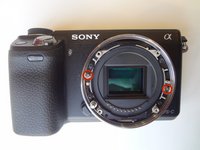
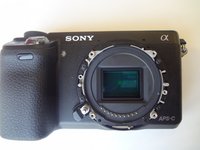
    1. Sony Alpha NEX-6 Lens Mount Replacement, Lens Mount: 手順 3、 1の画像 1
      • While dealing with this guide, do not touch the delicate image sensor (the center rectangle encircled by the lens mount).

      • After removing the lens, you will come into contact with the lens mount. Start by unscrewing the four 3.5 mm Phillips #00 screws.

      • The outer lens mount ring can now be removed.

      FixBotに聞いてみる

      コメントを追加

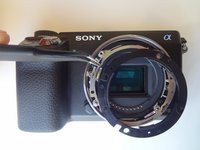
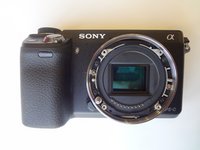
    2. Sony Alpha NEX-6 Lens Mount Replacement: 手順 4、 3の画像 1 Sony Alpha NEX-6 Lens Mount Replacement: 手順 4、 3の画像 2 Sony Alpha NEX-6 Lens Mount Replacement: 手順 4、 3の画像 3
      この手順で使用する道具:
      Tweezers
      $4.99
      • Pay attention to the positioning of the spacer rings for reassembly.

      • For the first (black) spacer ring, use the tweezers to gently pry the ring out of place.

      • Repeat this step for the second (silver) spacer ring.

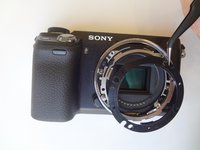
      • The third image is what the camera should look like after all spacer rings are removed.

      FixBotに聞いてみる

      コメントを追加

    3. Sony Alpha NEX-6 Lens Mount Replacement: 手順 5、 2の画像 1 Sony Alpha NEX-6 Lens Mount Replacement: 手順 5、 2の画像 2
      • To remove the inner lens mount ring, remove the two silver 2.0 mm Phillips #00 screws. This will complete the removal of the lens mount.

      FixBotに聞いてみる

      コメントを追加

終わりに

To reassemble your device, follow these instructions in reverse order.

キャンセル: このガイドを終了できませんでした。

3 の人々がこのガイドを完成させました。

作成者

4人の作成者と共同で作成されました。

Clayton Dale

メンバー登録日: 01/20/15

1,067 ポイント

7のガイドは作成済み

チーム

USF Tampa, Team 11-2, Blackwell Winter 2015 USF Tampa, Team 11-2, Blackwell Winter 2015人のメンバー

USFT-BLACKWELL-W15S11G2

4 メンバー

14のガイドは作成済み

0件のガイドコメント

コメントを追加

統計データ:

過去 24時間: 0

過去 7 日: 8

過去 30 日: 43

今までの合計 2,214