メインコンテンツにスキップ
リペアコミュニティに参加 - アカウントの作成

Sony Alpha 6000 Shutter Button Replacement

アーカイブされたガイド
このガイドは将来的な使用のためにのみ保存されてます。ご自身の修理作業には更新バージョンをご利用ください。

必要な工具と部品

    1. Sony Alpha 6000 Shutter Button Replacement, Battery: 手順 1、 1の画像 1
      • Make sure the camera is turned off by turning the switch to OFF.

      FixBotに聞いてみる

      コメントを追加

    2. Sony Alpha 6000 Shutter Button Replacement: 手順 2、 1の画像 1
      • Flip the camera around to access the battery compartment.

      • Slide the battery compartment lock to the left to unlock it.

      FixBotに聞いてみる

      コメントを追加

    3. Sony Alpha 6000 Shutter Button Replacement: 手順 3、 1の画像 1
      • Locate the blue latch that holds the battery in.

      FixBotに聞いてみる

      コメントを追加

    4. Sony Alpha 6000 Shutter Button Replacement: 手順 4、 1の画像 1
      • Push the latch back to release battery.

      FixBotに聞いてみる

      コメントを追加

    5. Sony Alpha 6000 Shutter Button Replacement: 手順 5、 1の画像 1
      • The battery can now be taken out of its compartment.

      FixBotに聞いてみる

      コメントを追加

    1. Sony Alpha 6000 Shutter Button Replacement, Back Cover: 手順 6、 1の画像 1
      • Turn the camera upside down and unscrew these two bottom 6 mm screws located on either side of the body by using the J00 head screw.

      FixBotに聞いてみる

      コメントを追加

    2. Sony Alpha 6000 Shutter Button Replacement: 手順 7、 1の画像 1
      • Turn the camera sideways.

      • Open the mini HDMI compartment and locate the two 6 mm screw underneath and another to the right of the compartment.

      • Unscrew using the J00 head screw.

      FixBotに聞いてみる

      コメントを追加

    3. Sony Alpha 6000 Shutter Button Replacement: 手順 8、 1の画像 1
      • Locate the two 4 mm screws within the battery compartment and unscrew them using the J00 screw head.

      FixBotに聞いてみる

      コメントを追加

    4. Sony Alpha 6000 Shutter Button Replacement: 手順 9、 1の画像 1
      • Bend the camera's screen forward to uncover two 3 mm screws below the eyepiece.

      • Locate them and unscrew them.

      FixBotに聞いてみる

      コメントを追加

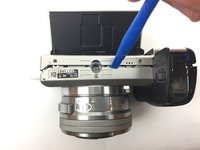
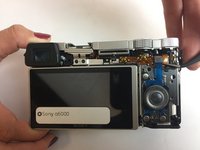
    5. Sony Alpha 6000 Shutter Button Replacement: 手順 10、 2の画像 1 Sony Alpha 6000 Shutter Button Replacement: 手順 10、 2の画像 2
      • Use a plastic opening tool around the body of the camera to wedge the back cover off. Start from the bottom next to the battery compartment.

      • If necessary, lightly use your hand to pull the the back cover down to completely remove it.

      FixBotに聞いてみる

      コメントを追加

    1. Sony Alpha 6000 Shutter Button Replacement, Shutter Button: 手順 11、 1の画像 1
      • Once the back cover is off, locate the flash of the camera and push it forward to open it

      FixBotに聞いてみる

      コメントを追加

    2. Sony Alpha 6000 Shutter Button Replacement: 手順 12、 1の画像 1
      • Locate the two 3 mm screws within the flash and unscrew them

      FixBotに聞いてみる

      コメントを追加

    3. Sony Alpha 6000 Shutter Button Replacement: 手順 13、 1の画像 1
      • Hold the camera from the bottom and using a spudger, go around the top of the camera and separate the top plastic piece from the main body.

      FixBotに聞いてみる

      コメントを追加

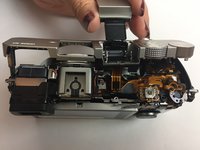
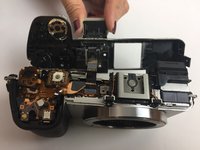
    4. Sony Alpha 6000 Shutter Button Replacement: 手順 14、 2の画像 1 Sony Alpha 6000 Shutter Button Replacement: 手順 14、 2の画像 2
      • Hold the top of the camera away from the body.

      • Carefully turn it over to uncover the bottom of the shutter button.

      FixBotに聞いてみる

      コメントを追加

    5. Sony Alpha 6000 Shutter Button Replacement: 手順 15、 1の画像 1
      • Locate the two screws holding the shutter button and unscrew them.

      FixBotに聞いてみる

      コメントを追加

    6. Sony Alpha 6000 Shutter Button Replacement: 手順 16、 1の画像 1
      この手順で使用する道具:
      Tweezers
      $4.99
      • Once the screws are out, use a pair of tweezers to pull out the circular metal piece under the shutter button.

      FixBotに聞いてみる

      コメントを追加

    7. Sony Alpha 6000 Shutter Button Replacement: 手順 17、 1の画像 1
      • Turn the top plastic piece back over.

      • Now you will be able to completely remove the camera's shutter button.

      FixBotに聞いてみる

      コメントを追加

終わりに

Now that the shutter button is removed, you will be able to replace it with a new piece. To reassemble your device, follow these instructions in reverse order.

キャンセル: このガイドを終了できませんでした。

7 の人々がこのガイドを完成させました。

作成者

6人の作成者と共同で作成されました。

Fernando Sierra

メンバー登録日: 09/30/16

400 ポイント

2のガイドは作成済み

チーム

USF Tampa, Team 4-5, Passmore Fall 2016 USF Tampa, Team 4-5, Passmore Fall 2016人のメンバー

USFT-PASSMORE-F16S4G5

3 メンバー

18のガイドは作成済み

4件のガイドコメント

Check also https://www.youtube.com/watch?v=y3CCJtD0...

You don't need to remove the back cover (and don't try it because first, you need to remove the top cover...)

Philippe Combronde - 返信 共有

Where can i buy a replacement button?

Simon Lundh - 返信 共有

You can find the flexible cable with the shutter button on aliexpress:

https://www.aliexpress.com/store/product...

Lac Uster - 返信 共有

Thank you!

Arshad kltn - 返信 共有

コメントを追加

統計データ:

過去 24時間: 5

過去 7 日: 38

過去 30 日: 157

今までの合計 20,078