メインコンテンツにスキップ
リペアコミュニティに参加 - アカウントの作成

Samsung Watch Active Battery Replacement

必要な工具と部品

    1. Samsung Watch Active Battery Replacement, Tools: 手順 1、 1の画像 1
      • Assemble all your tools

      FixBotに聞いてみる

      コメントを追加

    2. Samsung Watch Active Battery Replacement: 手順 2、 1の画像 1
      • Turn watch faced down to reveal the screws. Remove the straps by pulling on pin switches to release.

      FixBotに聞いてみる

      コメントを追加

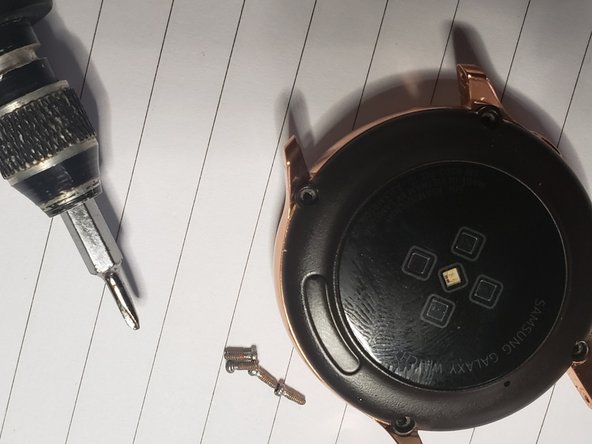
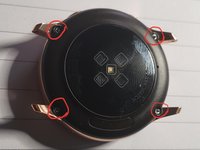
    3. Samsung Watch Active Battery Replacement: 手順 3、 2の画像 1 Samsung Watch Active Battery Replacement: 手順 3、 2の画像 2
      • remove the 4 screws

      FixBotに聞いてみる

      コメントを追加

    4. Samsung Watch Active Battery Replacement: 手順 4、 1の画像 1
      • Use the tin metal pry tool to gently penetrate the back.

      FixBotに聞いてみる

      コメントを追加

    5. Samsung Watch Active Battery Replacement: 手順 5、 1の画像 1
      • Use the metal pry tool as support for the opening blue pick

      FixBotに聞いてみる

      コメントを追加

    6. Samsung Watch Active Battery Replacement: 手順 6、 1の画像 1
      • Gently Lift the back to reveal a connector, use a tweezer to remove it then you will have access to the back

      FixBotに聞いてみる

      コメントを追加

    7. Samsung Watch Active Battery Replacement: 手順 7、 1の画像 1
      • Separate back fully from rest of the body

      FixBotに聞いてみる

      コメントを追加

    8. Samsung Watch Active Battery Replacement: 手順 8、 1の画像 1
      • use tweezer to remove all 3 connectors and remove the screw

      FixBotに聞いてみる

      コメントを追加

    9. Samsung Watch Active Battery Replacement: 手順 9、 1の画像 1
      • Use Spudger to lift panel housing from body

      FixBotに聞いてみる

      コメントを追加

    10. Samsung Watch Active Battery Replacement: 手順 10、 1の画像 1
      • Remove housing from watch body

      FixBotに聞いてみる

      コメントを追加

    11. Samsung Watch Active Battery Replacement: 手順 11、 1の画像 1
      • Lift off motherboard and use tweezer to lift up bettery connector from the plastic housing

      FixBotに聞いてみる

      コメントを追加

    12. Samsung Watch Active Battery Replacement: 手順 12、 1の画像 1
      • use spudger to lift battey out of plastic housing

      FixBotに聞いてみる

      コメントを追加

    13. Samsung Watch Active Battery Replacement: 手順 13、 1の画像 1
      • Separate battery from the plastic body, then install replacement battery

      FixBotに聞いてみる

      コメントを追加

終わりに

To reassemble your device, follow these instructions in reverse order.

キャンセル: このガイドを終了できませんでした。

5 の人々がこのガイドを完成させました。

作成者

2人の作成者と共同で作成されました。

Jimi Aloba

メンバー登録日: 10/18/19

377 ポイント

1ガイドが承認済み

2件のガイドコメント

I have so benefited from this portal , I have now made my own contribution. Hope it helps someone.

Jimi Aloba - 返信 共有

Excellent guide Haven't done it yet. Where can I find the battery for this watch, also what type of screwdriver are you using for the 1st 4 screws? None of mine fit it.

mnmacd - 返信 共有

コメントを追加

統計データ:

過去 24時間: 2

過去 7 日: 11

過去 30 日: 48

今までの合計 2,013