メインコンテンツにスキップ
リペアコミュニティに参加 - アカウントの作成

Samsung TL220 LCD Screen Replacement

必要な工具と部品

  1. Samsung TL220 LCD Screen Replacement, LCD Screen: 手順 1、 1の画像 1
    • Begin with unscrewing the seven outer screws on the camera. There is one on each corner and then three at the bottom.

    FixBotに聞いてみる

    コメントを追加

  2. Samsung TL220 LCD Screen Replacement: 手順 2、 1の画像 1
    • Now carefully pry open the back casing with the ifixit plastic opening tool.

    FixBotに聞いてみる

    コメントを追加

  3. Samsung TL220 LCD Screen Replacement: 手順 3、 1の画像 1
    • When the back casing is off, gently move the LCD screen to the side.

    • And then remove the three inner screws to remove the inside case.

    FixBotに聞いてみる

    コメントを追加

  4. Samsung TL220 LCD Screen Replacement: 手順 4、 1の画像 1
    • Unclip the four connectors that hold down the orange copper film strips.

    • Then carefully pull out the three film strips with the ifixit plastic opening tool.

    FixBotに聞いてみる

    コメントを追加

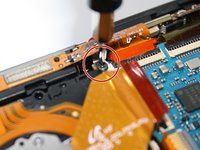
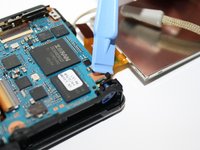
  5. Samsung TL220 LCD Screen Replacement: 手順 5、 2の画像 1 Samsung TL220 LCD Screen Replacement: 手順 5、 2の画像 2
    • Remove the screw located above the center film strip. This holds the top frame in place.

    FixBotに聞いてみる

    コメントを追加

  6. Samsung TL220 LCD Screen Replacement: 手順 6、 1の画像 1
    • Unclip the four connectors to release the film strips.

    FixBotに聞いてみる

    コメントを追加

  7. Samsung TL220 LCD Screen Replacement: 手順 7、 1の画像 1
    • Next unclamp the connector to release the film strip and then you can replace your LCD screen.

    FixBotに聞いてみる

    コメントを追加

終わりに

To reassemble your device, follow these instructions in reverse order.

キャンセル: このガイドを終了できませんでした。

2 の人々がこのガイドを完成させました。

作成者

3人の作成者と共同で作成されました。

Lesley

メンバー登録日: 03/03/15

170 ポイント

1ガイドが承認済み

チーム

3 Tech Girls 3 Tech Girls人のメンバー

Community

2 メンバー

4のガイドは作成済み

0件のガイドコメント

コメントを追加

統計データ:

過去 24時間: 3

過去 7 日: 16

過去 30 日: 44

今までの合計 937