はじめに
If your keycaps have either cosmetic or physical issues, use this guide to replace them. This guide should take over an hour if you don’t have a key-puller and/or intend on removing all of the keycaps, yet individual keys can be removed in under a minute.
The Razer Huntsman Tournament Edition is a tenkeyless mechanical keyboard. Its keycaps are easily swappable with minimal action required.
There is no prior knowledge needed in order to complete this guide.
必要な工具と部品
-
-
Place the unplugged keyboard on a flat, clean surface appropriate for working on.
 FixBotに聞いてみる
-
-


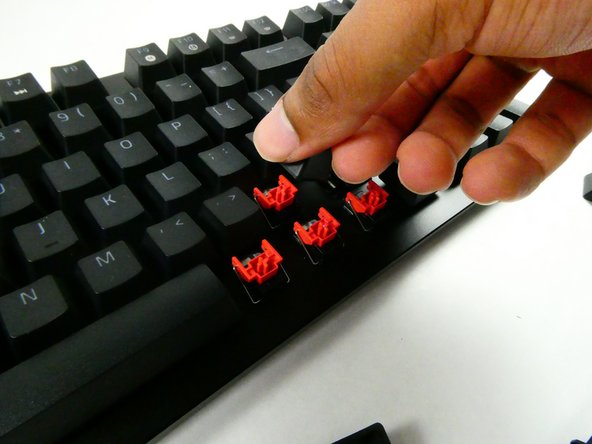
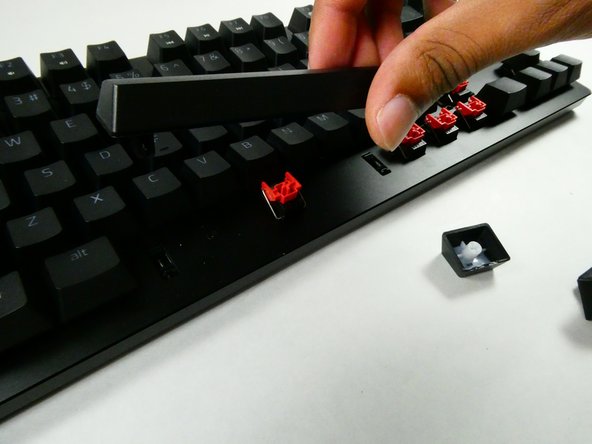
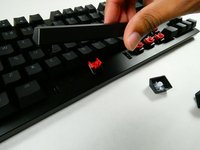
To reassemble your device, follow these instructions in reverse order.
2 の人々がこのガイドを完成させました。

チーム

UMass Dartmouth, Team 4-3, Sinclaire Fall 2022 UMass Dartmouth, Team 4-3, Sinclaire Fall 2022人のメンバー
UMASSD-SINCLAIRE-F22S4G3
5 メンバー
7のガイドは作成済み
