修理ガイド
手順毎の修理ガイドを使って、何にでも修理できる方法を学ぶ
アプリ
あなたの便利なリペアヘルパー。
FixBot
フレンドリーなAIリペアアシスタント。
リペアビリティ
修理できる製品がなぜ良いのでしょうか
分解
最新ガジェットの内側を覗いてみる
アンサーフォーラム
解決方法を共有して、友人に助けてもらう
自分に合うコミュニティを見つける
チーム、イベント、フィクサー仲間を探す。
ヘルプ・アウト
修理の知識を誰でも無料で利用できるようにする。
修理する権利
修理する権利のムーブメントやこの支持者になる方法を知る。
おすすめ
高品質のパーツとツールには、iFixitの生涯保証が付けられています。
ツール
精密ツールの厳選セレクションを見る
パーツ
iFixitの品質基準を満たしたパーツを購入する
iPhoneバッテリー
バッテリーは検査済みで保証付き、必要なすべてが揃ったキット。
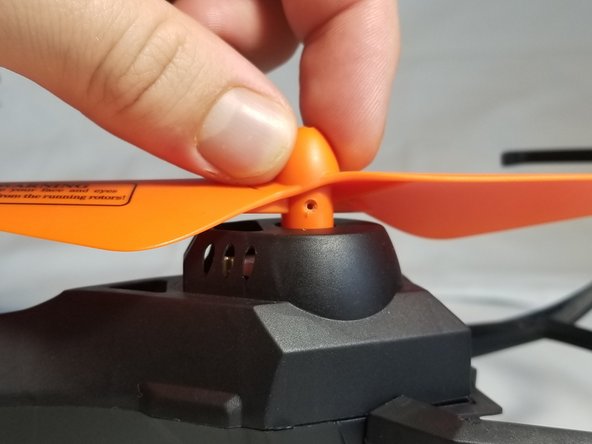
Rotate the propeller to locate the propeller set screw.
Unscrew the single 4 mm Phillips screw.
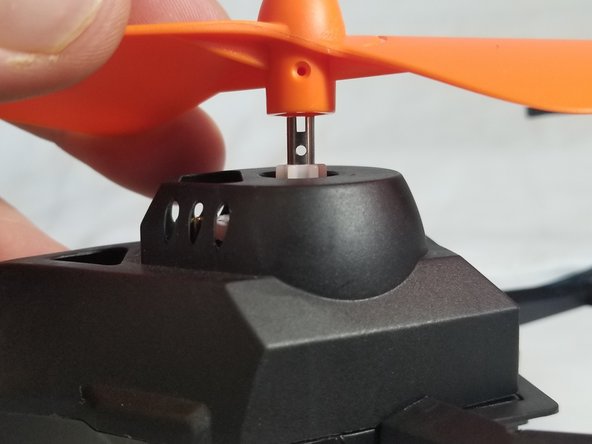
Slide the propeller up and off the motor assembly.
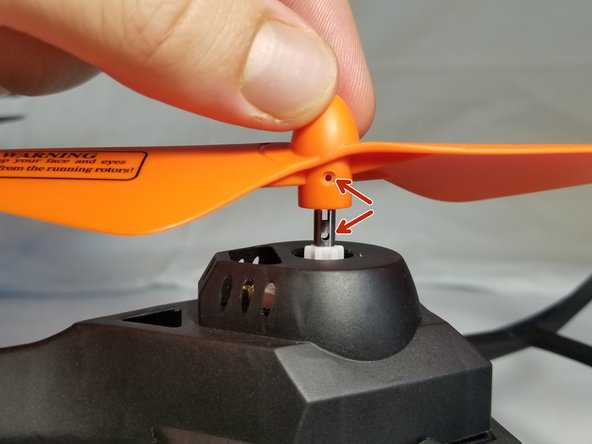
To attach the new propeller, align the hexagonal slot in the propeller base with the keyed motor shaft.
Ensure one of the screw holes on the motor shaft aligns with the propeller screw hole.
Slide the propeller onto the motor shaft.
Finally, fasten the set screw back into the propeller.
Congratulations, you have completed this propeller replacement guide! If your drone continues to malfunction, try exploring the motor replacement guide here
キャンセル: このガイドを終了できませんでした。
2人の作成者と共同で作成されました。
メンバー登録日: 01/12/15
617 ポイント
4のガイドは作成済み
バッジ: 13
+10 個以上のバッジ
CPSU-FORTE-W15S70G2
4 メンバー
10のガイドは作成済み
サイズを選択し、以下のコードをコピーして、このガイドを小さなウィジェットとしてサイト/フォーラムに埋め込みます。
過去 24時間: 0
過去 7 日: 3
過去 30 日: 26
今までの合計 427