メインコンテンツにスキップ
リペアコミュニティに参加 - アカウントの作成

Power Mac G4 M5183 Hard Drive Replacement

必要な工具と部品

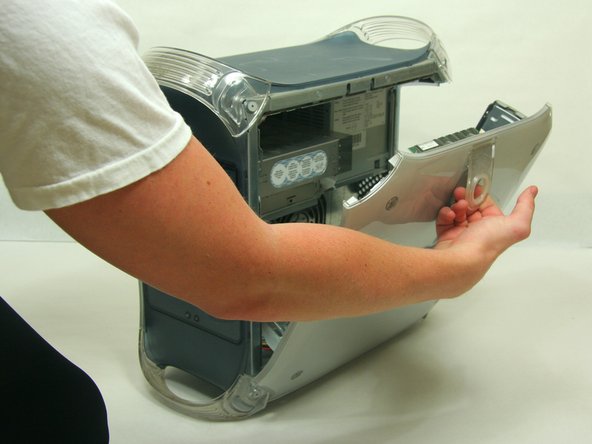
    1. Power Mac G4 M5183 Hard Drive Replacement, Opening PowerMac G4 M5183 Case: 手順 1、 2の画像 1 Power Mac G4 M5183 Hard Drive Replacement, Opening PowerMac G4 M5183 Case: 手順 1、 2の画像 2
      • Pull on outer latch.

      • Lower door until it is level with your work surface.

      • Before working on the computer make sure it is not plugged into a power supply, then touch a metal object. This discharges static electricity, which could damage the computer.

      FixBotに聞いてみる

      コメントを追加

    1. Power Mac G4 M5183 Hard Drive Replacement, Hard Drive: 手順 2、 2の画像 1 Power Mac G4 M5183 Hard Drive Replacement, Hard Drive: 手順 2、 2の画像 2
      • Remove the ribbon cable and power cable from the Hard Drive.

      FixBotに聞いてみる

      コメントを追加

    2. Power Mac G4 M5183 Hard Drive Replacement: 手順 3、 1の画像 1
      • Remove the screw which holds the Hard Drive tray in place.

      FixBotに聞いてみる

      コメントを追加

    3. Power Mac G4 M5183 Hard Drive Replacement: 手順 4、 1の画像 1
      • Slide the Hard Drive tray out of the computer.

      FixBotに聞いてみる

      コメントを追加

    4. Power Mac G4 M5183 Hard Drive Replacement: 手順 5、 1の画像 1
      • To remove the Hard Drive from the tray, unscrew the 4 screws on the bottom of the tray.

      FixBotに聞いてみる

      コメントを追加

ゴール

キャンセル: このガイドを終了できませんでした。

36 の人々がこのガイドを完成させました。

作成者

4人の作成者と共同で作成されました。

Justin Petrilli

メンバー登録日: 01/21/10

3,204 ポイント

11のガイドは作成済み

チーム

Cal Poly, Team 13-24, Maness Winter 2010 Cal Poly, Team 13-24, Maness Winter 2010人のメンバー

CPSU-MANESS-W10S13G24

4 メンバー

50のガイドは作成済み

0件のガイドコメント

コメントを追加

統計データ:

過去 24時間: 2

過去 7 日: 30

過去 30 日: 132

今までの合計 29,162