はじめに
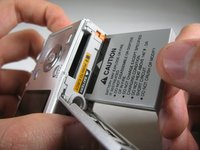
This guide will teach you how to properly remove and insert the camera's battery.
-
-
-
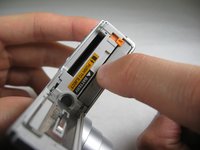
Flip camera over to bottom side. Slide battery cover to the right and flip open.
 FixBotに聞いてみる
-
-
-
-
To reinsert battery, if necessary repeat Step 1. Insert battery so that the side of the battery with "CAUTION" below the black bar with an arrow faces the label "BATTERY". Make sure to push battery until small, orange lever holds battery in place. Close battery cover.
-
-


2 の人々がこのガイドを完成させました。

チーム

Cal Poly, Team 4-29, Regan Winter 2011 Cal Poly, Team 4-29, Regan Winter 2011人のメンバー
CPSU-REGAN-W11S4G29
3 メンバー
10のガイドは作成済み
1件のガイドコメント
Hello,
My battery is stuck - even though I push the lever I can’t get a grip on the battery,
Thank you
