メインコンテンツにスキップ
リペアコミュニティに参加 - アカウントの作成

PSP 300xc Front Case Replacement

必要な工具と部品

  1. PSP 300xc Front Case Replacement, Battery: 手順 1、 2の画像 1 PSP 300xc Front Case Replacement, Battery: 手順 1、 2の画像 2
    • Press the button securing the battery door to the PSP 300xc, and lift the battery door off.

    • Lift the battery out of the PSP.

    FixBotに聞いてみる

    コメントを追加

  2. PSP 300xc Front Case Replacement, Front Case: 手順 2、 1の画像 1
    • Use a spudger or your fingernail to remove the warranty sticker stuck to the inside of the battery tray

    FixBotに聞いてみる

    コメントを追加

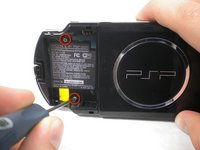
  3. PSP 300xc Front Case Replacement: 手順 3、 2の画像 1 PSP 300xc Front Case Replacement: 手順 3、 2の画像 2
    • Remove four Phillips screws from the back of the PSP.

    FixBotに聞いてみる

    コメントを追加

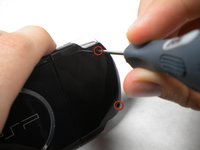
  4. PSP 300xc Front Case Replacement: 手順 4、 1の画像 1
    • Remove two Phillips screws from the top of the PSP.

    FixBotに聞いてみる

    コメントを追加

  5. PSP 300xc Front Case Replacement: 手順 5、 1の画像 1
    • Remove a single screw from the bottom edge of the PSP.

    FixBotに聞いてみる

    コメントを追加

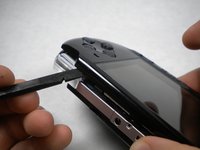
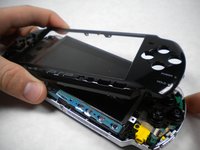
  6. PSP 300xc Front Case Replacement: 手順 6、 2の画像 1 PSP 300xc Front Case Replacement: 手順 6、 2の画像 2
    • Insert a spudger between the front case and PSP, and slide the spudger along the perimeter of the front case to remove it.

    FixBotに聞いてみる

    コメントを追加

終わりに

To reassemble your device, follow these instructions in reverse order.

キャンセル: このガイドを終了できませんでした。

3 の人々がこのガイドを完成させました。

作成者

3人の作成者と共同で作成されました。

Matthew Newsom

メンバー登録日: 01/05/10

42,811 ポイント

67のガイドは作成済み

0件のガイドコメント

コメントを追加

統計データ:

過去 24時間: 2

過去 7 日: 16

過去 30 日: 83

今までの合計 5,040