メインコンテンツにスキップ
リペアコミュニティに参加 - アカウントの作成

Optoma HD20 Light Bulb Replacement

必要な工具と部品

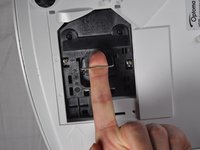
  1. Optoma HD20 Light Bulb Replacement, Rear Panel: 手順 1、 2の画像 1 Optoma HD20 Light Bulb Replacement, Rear Panel: 手順 1、 2の画像 2
    • Use a Phillips #1 screwdriver to loosen the screws that secure the panel on the bottom of the Optoma HD20.

    FixBotに聞いてみる

    コメントを追加

  2. Optoma HD20 Light Bulb Replacement: 手順 2、 1の画像 1
    • Lift the panel off of the device.

    FixBotに聞いてみる

    コメントを追加

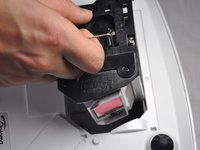
  3. Optoma HD20 Light Bulb Replacement, Light Bulb Casing: 手順 3、 1の画像 1
    • Use a Phillips #1 screwdriver to loosen the two screws securing the black casing.

    • The screws don't come out all the way.

    FixBotに聞いてみる

    コメントを追加

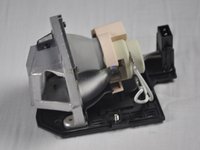
  4. Optoma HD20 Light Bulb Replacement: 手順 4、 3の画像 1 Optoma HD20 Light Bulb Replacement: 手順 4、 3の画像 2 Optoma HD20 Light Bulb Replacement: 手順 4、 3の画像 3
    • Remove the light bulb casing from the device.

    • Steps 5-9 are unnecessary if the replacement light bulb comes with housing.

    FixBotに聞いてみる

    コメントを追加

  5. Optoma HD20 Light Bulb Replacement, Light Bulb: 手順 5、 1の画像 1
    • Remove the three 4.5 mm screws on the light bulb case.

    FixBotに聞いてみる

    コメントを追加

  6. Optoma HD20 Light Bulb Replacement: 手順 6、 1の画像 1
    • Carefully remove the light bulb insulator from the light bulb casing.

    FixBotに聞いてみる

    コメントを追加

  7. Optoma HD20 Light Bulb Replacement: 手順 7、 1の画像 1
    この手順で使用する道具:
    Tweezers
    $4.99
    • Gently pull the wires off of the pins using tweezers.

    FixBotに聞いてみる

    コメントを追加

  8. Optoma HD20 Light Bulb Replacement: 手順 8、 1の画像 1
    • Remove the 4 screws on the back of the light bulb casing using a Phillips #1 screwdriver.

    FixBotに聞いてみる

    コメントを追加

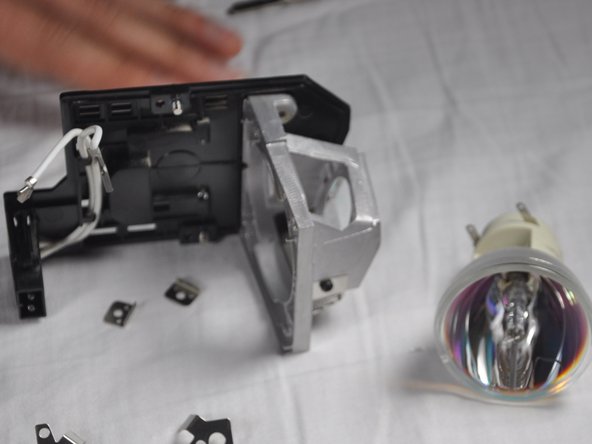
  9. Optoma HD20 Light Bulb Replacement: 手順 9、 2の画像 1 Optoma HD20 Light Bulb Replacement: 手順 9、 2の画像 2
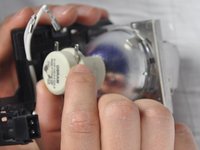
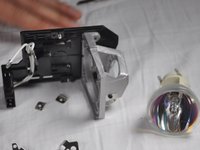
    • Remove the casing, then gently pull out the old light bulb and replace it with the new one.

    FixBotに聞いてみる

    コメントを追加

終わりに

To reassemble your device, follow these instructions in reverse order.

キャンセル: このガイドを終了できませんでした。

7 の人々がこのガイドを完成させました。

作成者

10人の作成者と共同で作成されました。

Trever

メンバー登録日: 01/22/15

1,282 ポイント

6のガイドは作成済み

チーム

Cal Poly, Team 21-23, Maness Winter 2015 Cal Poly, Team 21-23, Maness Winter 2015人のメンバー

CPSU-MANESS-W15S21G23

4 メンバー

6のガイドは作成済み

5件のガイドコメント

I recently replaced my bulb for the third time and the insulator had grown brittle I am guessing from the heat and it broke. I can't seem to find this part for sale anywhere. Does anyone know if is possible to purchase it?

Thomas - 返信 共有

The screws in step 8 are extremely hard to get off. I went and bought proper screwdrivers before even attempting since theyre small, but in a day I've only managed to get one off and I'm having to resort to other tactics, even using a drill to just grind the heads off.

dv01_ - 返信 共有

king@okinlamps.com

Need LAD60 20PCS

kingshen92 - 返信 共有

The manual says the new light won’t come back on until a lamp reset I’d done via menu , but how can you see the text if the light isn’t on?????

Taringajohn - 返信 共有

my hd 20 projects dull images i recently replaced my bulb for the first time successfully and i followed as per menu trying to bulb reset but it is not working and still image is dull how to solve the problem

kumar - 返信 共有

コメントを追加

統計データ:

過去 24時間: 3

過去 7 日: 9

過去 30 日: 61

今までの合計 12,732