メインコンテンツにスキップ
リペアコミュニティに参加 - アカウントの作成

One Education Infinity:One Keyboard Replacement

必要な工具と部品

  1. One Education Infinity:One Keyboard Replacement, Back Case: 手順 1、 2の画像 1 One Education Infinity:One Keyboard Replacement, Back Case: 手順 1、 2の画像 2
    • Use a spudger to pry the four rubber pads away from the bottom of the case.

    • Use a Phillips #00 screwdriver to unscrew the four 6.4 mm screws.

  2. One Education Infinity:One Keyboard Replacement: 手順 2、 2の画像 1 One Education Infinity:One Keyboard Replacement: 手順 2、 2の画像 2
    • Insert a Jimmy or other prying tool into the seam on the edge of the casing.

    • Trace along the edges of the device until all clips are released.

    • Lift the back case away from the device.

  3. One Education Infinity:One Keyboard Replacement: 手順 3、 1の画像 1
    • Use a Phillips #00 screwdriver to unscrew the four 6.4mm screws on the hinge mounts.

  4. One Education Infinity:One Keyboard Replacement: 手順 4、 2の画像 1 One Education Infinity:One Keyboard Replacement: 手順 4、 2の画像 2
    この手順で使用する道具:
    Tweezers
    $4.99
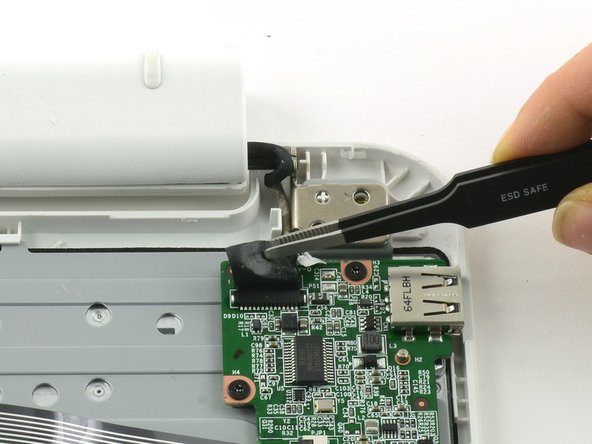
    • Use tweezers to lift the fabric cover and hinge connector away from the daughterboard.

    • Always use ESD safe tools when working with delicate electrical components.

  5. One Education Infinity:One Keyboard Replacement, Daughterboard: 手順 5、 2の画像 1 One Education Infinity:One Keyboard Replacement, Daughterboard: 手順 5、 2の画像 2
    • Flip up the black retaining flap on the ZIF connector holding the large grey ribbon cable in place.

    • Pull the ribbon cable straight out of the ZIF connector.

  6. One Education Infinity:One Keyboard Replacement: 手順 6、 2の画像 1 One Education Infinity:One Keyboard Replacement: 手順 6、 2の画像 2
    この手順で使用する道具:
    Tweezers
    $4.99
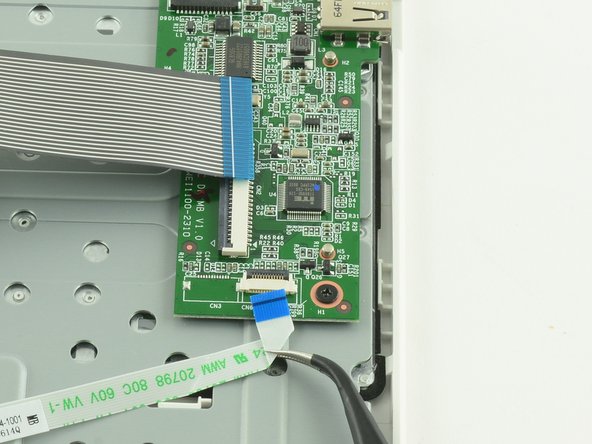
    • Use the flat end of a spudger to flip up the black tab on the smaller ZIF connector.

    • Use tweezers to pull the ribbon cable straight out of the connector.

  7. One Education Infinity:One Keyboard Replacement: 手順 7、 3の画像 1 One Education Infinity:One Keyboard Replacement: 手順 7、 3の画像 2 One Education Infinity:One Keyboard Replacement: 手順 7、 3の画像 3
    • Use a Phillips #000 screwdriver to unscrew the three 3.4mm screws.

    • Lift the daughterboard away from the device to remove.

  8. One Education Infinity:One Keyboard Replacement, Keyboard Frame Prerequisite: 手順 8、 2の画像 1 One Education Infinity:One Keyboard Replacement, Keyboard Frame Prerequisite: 手順 8、 2の画像 2
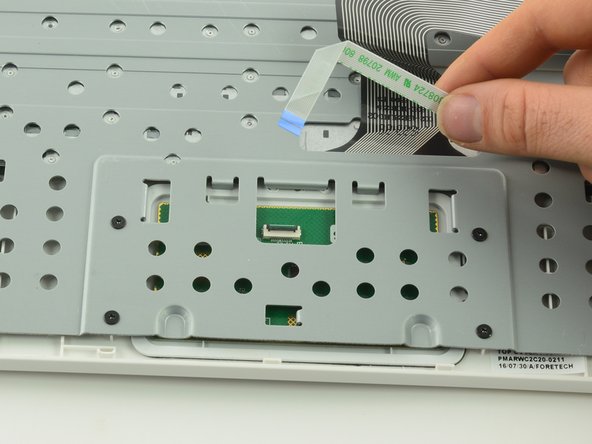
    • Use a spudger to lift up the black retaining flap on the touchpad's ZIF connector.

    • Pull the ribbon cable straight back to remove.

  9. One Education Infinity:One Keyboard Replacement: 手順 9、 1の画像 1
    • Use a Phillips #00 screwdriver to unscrew the four 6.4mm screws holding the touchpad in place.

  10. One Education Infinity:One Keyboard Replacement: 手順 10、 2の画像 1 One Education Infinity:One Keyboard Replacement: 手順 10、 2の画像 2
    • Feed the ribbon cable through the hole in the metal frame.

    • Left the metal frame away from the device.

  11. One Education Infinity:One Keyboard Replacement, Keyboard: 手順 11、 1の画像 1
    • Lift one end of the keyboard up to peel it away from the case.

    • Don't be alarmed if you hear cracking sounds as you pry the keyboard away from the frame. There are dozens of plastic rivets holding the keyboard to the plastic frame.

終わりに

To reassemble your device, follow these instructions in reverse order.

作成者

1人の作成者と共同作成されました。

Taylor Bratsch

メンバー登録日: 09/06/16

6,101 ポイント

14のガイドは作成済み

0件のガイドコメント

コメントを追加

統計データ:

過去 24時間: 0

過去 7 日: 1

過去 30 日: 16

今までの合計 322