メインコンテンツにスキップ
リペアコミュニティに参加 - アカウントの作成

Nokia XL Dual Sim Rear Camera Replacement

必要な工具と部品

  1. Nokia XL Dual Sim Rear Camera Replacement, Back Cover Removal: 手順 1、 1の画像 1
    • You will first need to separate the back cover from the device.

    • Gently pry open each side of the device at the indicated locations. It is best to use a plastic opening tool or similar tool.

    FixBotに聞いてみる

    コメントを追加

  2. Nokia XL Dual Sim Rear Camera Replacement, Battery Removal: 手順 2、 2の画像 1 Nokia XL Dual Sim Rear Camera Replacement, Battery Removal: 手順 2、 2の画像 2
    • Remove the back cover.

    • Use a plastic opening tool to lift the battery. Then, remove it.

    FixBotに聞いてみる

    コメントを追加

  3. Nokia XL Dual Sim Rear Camera Replacement, Screen Separation part 1: 手順 3、 2の画像 1 Nokia XL Dual Sim Rear Camera Replacement, Screen Separation part 1: 手順 3、 2の画像 2
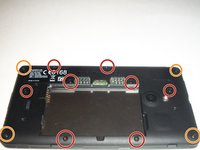
    • To access the inner components of the device, remove the various screws. Keep them separate, and organize them by size.

    • You will need a T5 Precision Torx screw driver to remove the screws.

    • The locations of the T5x3.4mm screws are indicated in the picture.

    • The locations of the T5x4.1mm screws are indicated in the picture.

    FixBotに聞いてみる

    コメントを追加

  4. Nokia XL Dual Sim Rear Camera Replacement, Screen Separation part 2: 手順 4、 3の画像 1 Nokia XL Dual Sim Rear Camera Replacement, Screen Separation part 2: 手順 4、 3の画像 2 Nokia XL Dual Sim Rear Camera Replacement, Screen Separation part 2: 手順 4、 3の画像 3
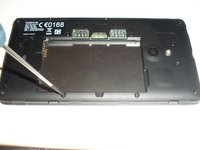
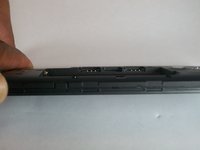
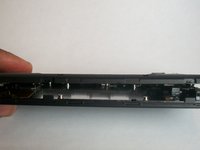
    • Use the plastic opening tool to gently pry the device apart.

    • There are flaps on both sides of the phone as indicated in the picture. This is what you will need to pry apart.

    • Please be cautious when opening the device. There are various connectors inside the device that must be handled with care.

    FixBotに聞いてみる

    コメントを追加

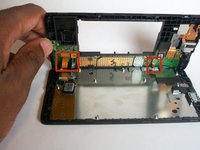
  5. Nokia XL Dual Sim Rear Camera Replacement, System components: 手順 5、 1の画像 1
    • Once the device is open, take note of all the components.

    FixBotに聞いてみる

    コメントを追加

  6. Nokia XL Dual Sim Rear Camera Replacement, Camera Removal Pt. 1: 手順 6、 2の画像 1 Nokia XL Dual Sim Rear Camera Replacement, Camera Removal Pt. 1: 手順 6、 2の画像 2
    この手順で使用する道具:
    Tweezers
    $4.99
    • With tweezers, gently release the rear camera motherboard connector.

    FixBotに聞いてみる

    コメントを追加

  7. Nokia XL Dual Sim Rear Camera Replacement, Camera Removal Pt. 2: 手順 7、 3の画像 1 Nokia XL Dual Sim Rear Camera Replacement, Camera Removal Pt. 2: 手順 7、 3の画像 2 Nokia XL Dual Sim Rear Camera Replacement, Camera Removal Pt. 2: 手順 7、 3の画像 3
    • Gently pull the motherboard connector upward to remove the rear camera component.

    FixBotに聞いてみる

    コメントを追加

終わりに

To reassemble your device, follow these instructions in reverse order.

キャンセル: このガイドを終了できませんでした。

ある他の人がこのガイドを完成しました。

作成者

6人の作成者と共同で作成されました。

Shadeed Bilal

メンバー登録日: 09/25/14

231 ポイント

4のガイドは作成済み

チーム

USF Tampa, Team 1-4, Brown Fall 2014 USF Tampa, Team 1-4, Brown Fall 2014人のメンバー

USFT-BROWN-F14S1G4

3 メンバー

7のガイドは作成済み

0件のガイドコメント

コメントを追加

統計データ:

過去 24時間: 2

過去 7 日: 14

過去 30 日: 40

今までの合計 1,079