はじめに
Potential damage could occur to the rear LCD screen which could affect performance. For safety purposes, please remove the battery before working with any electronic components.
必要な工具と部品
-
-
Using a Philips #00 screwdriver, remove the four 6.2mm from the left and right sides of the outer cover.
 FixBotに聞いてみる
-
-
この手順で使用する道具:Tweezers$4.99
-
Use tweezers to gently flip the small locking flap of the zero force insertion connector up.
-
Pull the orange connector cable away from the main body of the camera using the tweezers.
-
Remove the back cover.
-
-
-
-
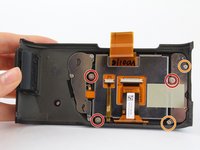
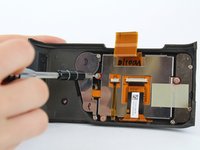
Using a Philips #00 screwdriver, remove the three 4.3 mm screws by rotating screwdriver to the left.
-
Use the Phillips #00 screwdriver to remove the two 3.4 mm screws.
-
-
-
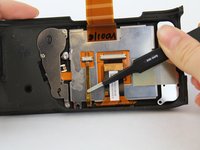
Using blunt tweezers, gently flip the small locking flap of the zero force insertion connector up for both connectors.
-
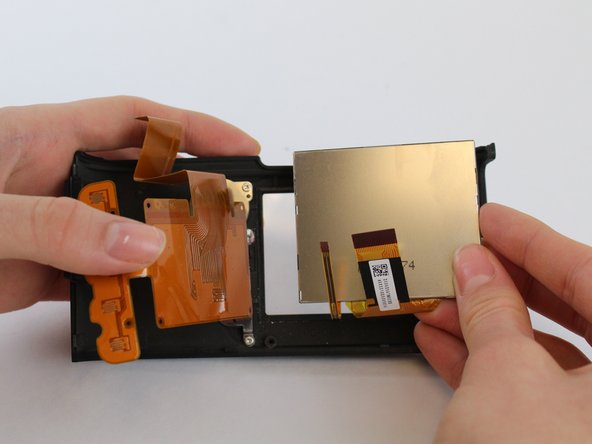
Use blunt tweezers to pull the left ribbon connector out of the zero insertion force connector.
-
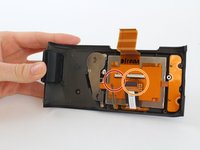
Using the same tweezers, pull the right ribbon connector out of the zero insertion force connector.
-





To reassemble your device, follow these instructions in reverse order.
ある他の人がこのガイドを完成しました。

チーム

USF Tampa, Team S1-G1, Leahy Fall 2017 USF Tampa, Team S1-G1, Leahy Fall 2017人のメンバー
USFT-LEAHY-F17S1G1
4 メンバー
5のガイドは作成済み
