メインコンテンツにスキップ
リペアコミュニティに参加 - アカウントの作成

Motorola Moto E Display Assembly Replacement

必要な工具と部品

  1. Motorola Moto E Display Assembly Replacement, Motherboard: 手順 1、 1の画像 1
    • Turn off the device before beginning.

    • To remove the back cover, start at one corner and stick the plastic opening tool under the cover and pry it away from the phone.

    • With the plastic opening tool, pry all the way around the phone while lifting up on the cover.

    • You should hear a snapping sound at each corner.

    FixBotに聞いてみる

    コメントを追加

  2. Motorola Moto E Display Assembly Replacement: 手順 2、 1の画像 1
    • Unscrew the 14 4mm screws using a T4 Torx screwdriver.

    FixBotに聞いてみる

    コメントを追加

  3. Motorola Moto E Display Assembly Replacement: 手順 3、 1の画像 1
    • Using a plastic opening tool, pry up on the edges of the plastic back cover.

    • Be sure that all of the screws are out before lifting the cover. The plastic backing is fragile, and it may break.

    FixBotに聞いてみる

    コメントを追加

  4. Motorola Moto E Display Assembly Replacement: 手順 4、 1の画像 1
    • Gently lift the back plate away, exposing the motherboard. The battery will be stuck to the back of the cover, so be careful when lifting it off.

    • Do not touch the connections to the battery in the red square on the picture.

    FixBotに聞いてみる

    コメントを追加

  5. Motorola Moto E Display Assembly Replacement: 手順 5、 1の画像 1
    • Gently pull up on the red and black power cable to lift the connector out of the motherboard.

    • Move the battery and cover away from the motherboard.

    FixBotに聞いてみる

    コメントを追加

  6. Motorola Moto E Display Assembly Replacement: 手順 6、 1の画像 1
    • Remove the three 1 mm screws using a T4 Torx screwdriver.

    FixBotに聞いてみる

    コメントを追加

  7. Motorola Moto E Display Assembly Replacement: 手順 7、 1の画像 1
    • Lift up on the white plastic mount.

    • Pull the orange ribbon cable out gently.

    FixBotに聞いてみる

    コメントを追加

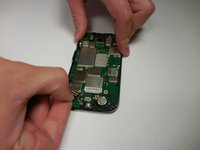
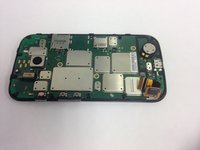
  8. Motorola Moto E Display Assembly Replacement: 手順 8、 2の画像 1 Motorola Moto E Display Assembly Replacement: 手順 8、 2の画像 2
    • Gently pull the black ribbon cable out.

    FixBotに聞いてみる

    コメントを追加

  9. Motorola Moto E Display Assembly Replacement: 手順 9、 1の画像 1
    • Using the metal spudger, pry the motherboard away from the screen assembly.

    FixBotに聞いてみる

    コメントを追加

  10. Motorola Moto E Display Assembly Replacement, Display Assembly: 手順 10、 1の画像 1
    • Use a heat gun or hairdryer to heat up the edges. This will loosen the glue so the screen can be removed.

    • The phone will be extremely hot. Avoid direct contact with metal pieces.

    FixBotに聞いてみる

    コメントを追加

  11. Motorola Moto E Display Assembly Replacement: 手順 11、 1の画像 1
    • Gently slide the metal spudger underneath the screen and pry it away from the backing.

    • Move the metal spudger under the digitizer and along the entire length of the phone to separate the screen from the adhesive.

    • If the screen was broken, glass shards may come off of the screen and puncture skin.

    FixBotに聞いてみる

    コメントを追加

  12. Motorola Moto E Display Assembly Replacement: 手順 12、 1の画像 1
    • Continue to heat and separate until the screen comes completely apart from the rest of the phone.

    FixBotに聞いてみる

    コメントを追加

  13. Motorola Moto E Display Assembly Replacement: 手順 13、 1の画像 1
    • To put the new screen on, press the new screen and digitizer into place, and then reapply heat to adhere the new screen.

    FixBotに聞いてみる

    コメントを追加

終わりに

To reassemble your device, follow these instructions in reverse order.

キャンセル: このガイドを終了できませんでした。

24 の人々がこのガイドを完成させました。

作成者

4人の作成者と共同で作成されました。

Alex Craig

メンバー登録日: 03/11/15

2,611 ポイント

5のガイドは作成済み

チーム

Colorado Springs, Team 5-7, Panko Spring 2015 Colorado Springs, Team 5-7, Panko Spring 2015人のメンバー

UCCS-PANKO-S15S5G7

2 メンバー

10のガイドは作成済み

0件のガイドコメント

コメントを追加

統計データ:

過去 24時間: 0

過去 7 日: 29

過去 30 日: 79

今までの合計 32,074