はじめに
Use this prerequisite guide as an initial step before accessing the internal components of the speaker.
必要な工具と部品
-
-
-
Unscrew the two black flat-top screws that attach the handle to the speaker with your hands.
 FixBotに聞いてみる
-
-
-
-
-
-
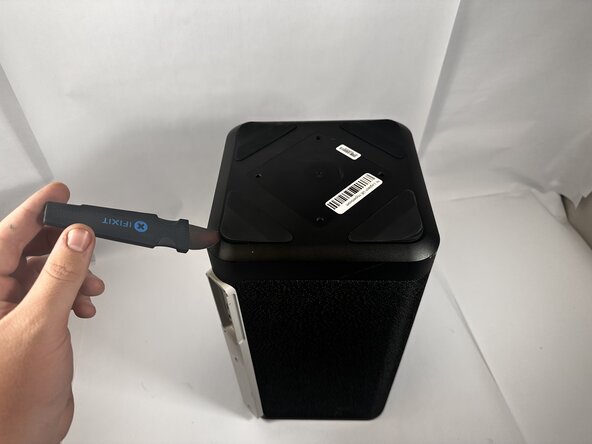
Use the Jimmy to pry off the four rubber feet on the bottom of the speaker.
-
-
-
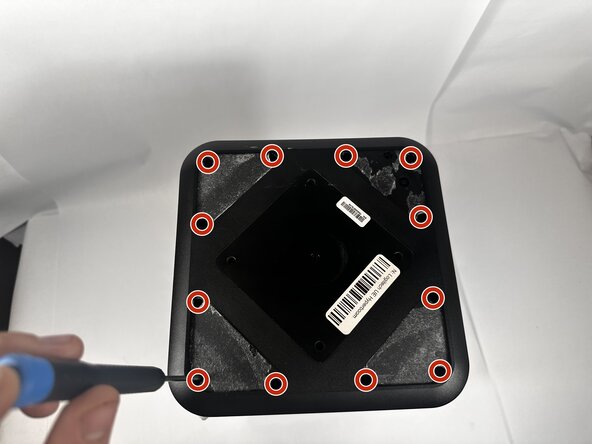
Use a Phillips #0 screwdriver to remove all twelve 11.7mm screws from the bottom panel of the speaker.
-
Pull the panel off to access the internal components.
-
-






To reassemble your device, follow these instructions in reverse order.
ある他の人がこのガイドを完成しました。

チーム

Idaho State University, Team 1-2, Watkins Spring 2026 Idaho State University, Team 1-2, Watkins Spring 2026人のメンバー
ISU-WATKINS-S26S1G2
3 メンバー
16のガイドは作成済み
