この翻訳は機械によって生成されたものであり、まだ人間による校正は行われていません。 日本語を話せますか? レビューはこちらから。
はじめに
ウィンドウのドラッグ操作に問題が発生するようになりました。最初は、最近WindowsからLinux OSに切り替えたためソフトウェアの問題かと思いましたが、両方のOSで問題が続いたため、ハードウェアの問題であることが明らかになりました。こうしてトラックボールマウスの分解が始まりました。あとは歴史の通りです!この修理ガイドでは、Logitech M570を分解し、スイッチを交換する手順を説明します。スイッチの交換にははんだ付けの技術が必要になることに注意してください。ボールセンサーの交換だけであれば、はんだ付けの技術がなくても対応できるかもしれません。
必要な工具と部品
-
-
-
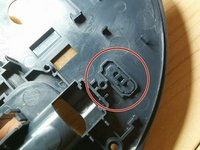
画像のように3つのパッドを外す
-
プラスドライバー(#1)を使用して5本のネジを外す
-
最後の1本はバッテリーのラベルの下に隠れている。穴を開けてアクセスする必要がある
-
-
-
-
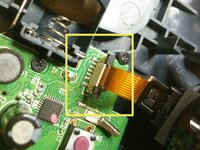
ラッチを持ち上げ、フレキシブル回路をコネクタから引き抜きます。トラックボールセンサーを取り外します。
-
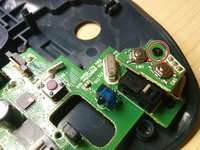
1本目のネジを外し、小さなプリント基板/PCBを取り外します。
-
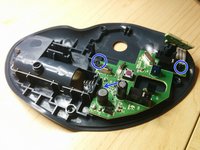
残りのネジ3本を外します。最後のネジは、写真ではコンデンサの裏側に隠れています。
-
-
-
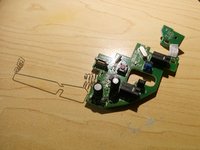
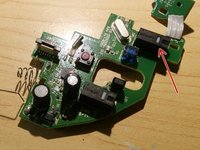
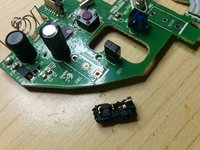
ご覧の通り、スイッチの1つが完全に破損しています。交換が必要です。
-
どれを選んでも大差はありません。違いは操作力です。オリジナル品は75 gfで、軽いクリック感があります。交換用として150 gfのものを選んだのは、そちらの方が長持ちすると考えたためです。
-
古いスイッチを取り外します。少しコツがいります。3本のピンを同時に加熱するために、はんだごてを複数使うか、ヒートガンを使うとよいでしょう。やり方は自由ですが、火傷に注意してください。ちなみに、これは初めてのはんだ付け作業としては最適なプロジェクトとは言えません。
-
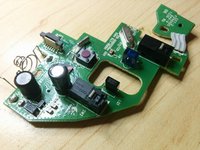
新しいスイッチをはんだ付けします。
-


 FixBotに聞いてみる






デバイスを再組み立てするには、これらのインストラクションを逆の順番に従って作業を進めてください。
40 の人々がこのガイドを完成させました。

24件のガイドコメント
Instructions are very clear and accurate. The most difficult part of this repair is de-soldering the switch, additional information is needed for this step.
Hugo Castro - 返信 共有
Folks, use a solder sucker and a solder wick. There should be many articles out there on using solder (extractor) sucker and wick. But basically you melt solder , solder sucker sucks up the most of it (Put the tip right over the end of the metal leg RIGHT after melting) All has to happenen very quickly.
Then the solder wick, you rub over the metal pins using the solder iron to push it along the PCB around the pins and the switch will just drop out.
No offence to any one but the article author did say not advised for your first solder experience, and using solder wick etc would be a veteran solder master trick.
john sloan - 返信 共有
Fine multi-strand wire from an old phone extension cable is good as a wick to remove solder - use a tiny amount of flux to help.
Christopher - 返信 共有
An aside to replacing the switches: if you’re having problems with click bounce and a regular contact cleaner isn’t working you could try an oil for electric model train motor commutators: Peco Electrics Power-Lube PL-64 - I picked up a little in a model shop but you can buy it online in the UK for around £6 to £7 for a couple of mL - the key bounce problems have largely disappeared after one or two applications both for my M570s and for an older cordless trackman wheel that I had given up on. If you have one of these it is worth noting that they will run perfectly well on NiMH rechargeable cells whereas the M570 will not. The latter may win out on simple battery life but on the environmental side: using a rechargeable cell should be better in the longer term especially as the grid gets a higher proportion of renewables.
Christopher - 返信 共有
