メインコンテンツにスキップ
リペアコミュニティに参加 - アカウントの作成

Logitech G400s Mouse Cable Replacement

必要な工具と部品

    1. Logitech G400s Mouse Cable Replacement, Mouse Cable: 手順 1、 1の画像 1
      • Use a Jimmy to remove the mouse feet.

      • Be careful to remove any film left by the mouse feet as well.

      FixBotに聞いてみる

      コメントを追加

    2. Logitech G400s Mouse Cable Replacement: 手順 2、 1の画像 1
      • Remove the bottom mouse foot using a Jimmy and the same technique as in Step 1.

      FixBotに聞いてみる

      コメントを追加

    3. Logitech G400s Mouse Cable Replacement: 手順 3、 1の画像 1
      • Use a Phillips #1 screwdriver to remove the three 5 mm Philips screws on the bottom surface.

      FixBotに聞いてみる

      コメントを追加

    4. Logitech G400s Mouse Cable Replacement: 手順 4、 1の画像 1
      • Gently pull the upper shell away from the bottom platform.

      FixBotに聞いてみる

      コメントを追加

    5. Logitech G400s Mouse Cable Replacement: 手順 5、 1の画像 1
      • This is what the G400s will look like when the top shell is taken off.

      FixBotに聞いてみる

      コメントを追加

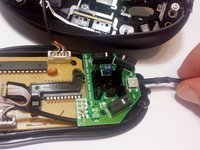
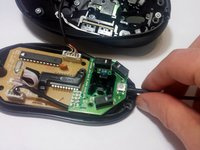
    6. Logitech G400s Mouse Cable Replacement: 手順 6、 2の画像 1 Logitech G400s Mouse Cable Replacement: 手順 6、 2の画像 2
      • Push the cable into its proper place inside the mouse shell.

      FixBotに聞いてみる

      コメントを追加

終わりに

To reassemble your device, follow these instructions in reverse order.

キャンセル: このガイドを終了できませんでした。

ある他の人がこのガイドを完成しました。

作成者

2人の作成者と共同で作成されました。

Max Evans

メンバー登録日: 09/28/16

433 ポイント

3のガイドは作成済み

チーム

USF Tampa, Team 16-7, Eyestone Fall 2016 USF Tampa, Team 16-7, Eyestone Fall 2016人のメンバー

USFT-EYESTONE-F16S16G7

1 メンバー

9のガイドは作成済み

0件のガイドコメント

コメントを追加

統計データ:

過去 24時間: 2

過去 7 日: 6

過去 30 日: 24

今までの合計 5,098