メインコンテンツにスキップ
リペアコミュニティに参加 - アカウントの作成

Lenovo Essential G570 Fan Replacement

必要な工具と部品

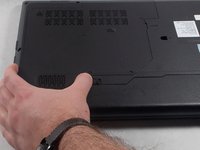
    1. Lenovo Essential G570 Fan Replacement, Battery: 手順 1、 1の画像 1
      • Turn off the laptop.

      • Disconnect the charging cable.

      • Failure to unplug the cable could result in electric shock.

      • Turn the computer upside down.

      FixBotに聞いてみる

      コメントを追加

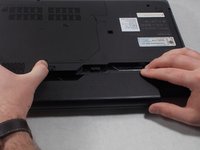
    2. Lenovo Essential G570 Fan Replacement: 手順 2、 2の画像 1 Lenovo Essential G570 Fan Replacement: 手順 2、 2の画像 2
      • Locate the two switches that lock the battery.

      • Push the right switch outwards to unlock the battery.

      FixBotに聞いてみる

      コメントを追加

    3. Lenovo Essential G570 Fan Replacement: 手順 3、 2の画像 1 Lenovo Essential G570 Fan Replacement: 手順 3、 2の画像 2
      • Push and hold the left switch outwards to unlock the battery.

      • Pull the battery away from the computer.

      FixBotに聞いてみる

      コメントを追加

    1. Lenovo Essential G570 Fan Replacement, Back Panel: 手順 4、 1の画像 1
      • Turn the laptop over so that the bottom side is facing up.

      FixBotに聞いてみる

      コメントを追加

    2. Lenovo Essential G570 Fan Replacement: 手順 5、 1の画像 1
      • Unscrew the five 5mm Phillips #0 screws that hold the cover in place.

      • The screws do not come out fully from the back plate. They stay attached to the plate itself.

      FixBotに聞いてみる

      コメントを追加

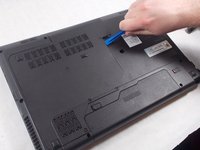
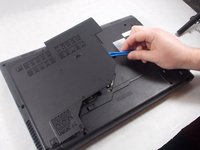
    3. Lenovo Essential G570 Fan Replacement: 手順 6、 3の画像 1 Lenovo Essential G570 Fan Replacement: 手順 6、 3の画像 2 Lenovo Essential G570 Fan Replacement: 手順 6、 3の画像 3
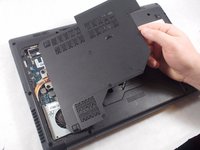
      • With the screws removed, insert the plastic opening tool into the groove located on the right side.

      • Begin to pry up, and the plate should lift up from the body of the laptop.

      • While lifting up, take the piece in one hand and pull up and to the right to fully remove the back plate.

      FixBotに聞いてみる

      コメントを追加

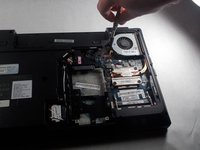
    1. Lenovo Essential G570 Fan Replacement, Fan: 手順 7、 2の画像 1 Lenovo Essential G570 Fan Replacement, Fan: 手順 7、 2の画像 2
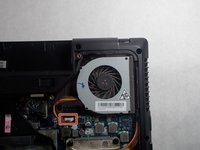
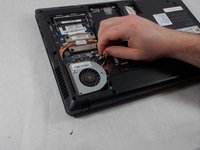
      • Carefully pull the fan's power connector from the laptop.

      FixBotに聞いてみる

      コメントを追加

    2. Lenovo Essential G570 Fan Replacement: 手順 8、 2の画像 1 Lenovo Essential G570 Fan Replacement: 手順 8、 2の画像 2
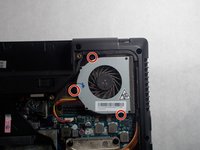
      • Remove the three 5mm Phillips #1 screws holding the fan in place.

      FixBotに聞いてみる

      コメントを追加

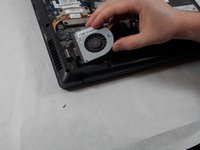
    3. Lenovo Essential G570 Fan Replacement: 手順 9、 2の画像 1 Lenovo Essential G570 Fan Replacement: 手順 9、 2の画像 2
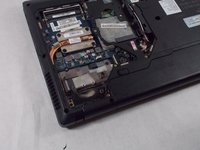
      • Remove the fan by pulling it up and away from the computer.

      FixBotに聞いてみる

      コメントを追加

終わりに

To reassemble your device, follow these instructions in reverse order.

キャンセル: このガイドを終了できませんでした。

2 の人々がこのガイドを完成させました。

作成者

2人の作成者と共同で作成されました。

Lucio

メンバー登録日: 03/06/18

235 ポイント

2のガイドは作成済み

チーム

UMass Dartmouth, Team S1-G1, Simcock Spring 2018 UMass Dartmouth, Team S1-G1, Simcock Spring 2018人のメンバー

UMASSD-SIMCOCK-S18S1G1

3 メンバー

18のガイドは作成済み

0件のガイドコメント

コメントを追加

統計データ:

過去 24時間: 1

過去 7 日: 4

過去 30 日: 25

今までの合計 978