メインコンテンツにスキップ
リペアコミュニティに参加 - アカウントの作成

LG Xenon Battery Replacement

  1. LG Xenon Battery Replacement, Back Case: 手順 1、 1の画像 1
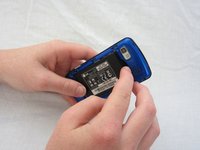
    • Turn the phone so the back side is face up.

  2. LG Xenon Battery Replacement: 手順 2、 2の画像 1 LG Xenon Battery Replacement: 手順 2、 2の画像 2
    • Use your thumb to press on the small ridge at the bottom of the phone, then push upward to slide off the back casing.

  3. LG Xenon Battery Replacement, Battery: 手順 3、 2の画像 1 LG Xenon Battery Replacement, Battery: 手順 3、 2の画像 2
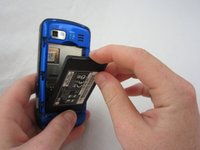
    • Use your index finger to pull the top of the battery out from the top center divot. Then pull the battery towards yourself to remove it from the compartment.

終わりに

To reassemble your device, follow these instructions in reverse order.

2 の人々がこのガイドを完成させました。

作成者

6人の作成者と共同で作成されました。

Micaela Saqui

メンバー登録日: 04/19/12

78 ポイント

7のガイドは作成済み

チーム

Cal Poly, Team 9-41, Regan Spring 2012 Cal Poly, Team 9-41, Regan Spring 2012人のメンバー

CPSU-REGAN-S12S9G41

5 メンバー

19のガイドは作成済み

0件のガイドコメント

コメントを追加

統計データ:

過去 24時間: 12

過去 7 日: 23

過去 30 日: 43

今までの合計 1,501