メインコンテンツにスキップ
リペアコミュニティに参加 - アカウントの作成

LG VX6100 Keypad Replacement

必要な工具と部品

  1. LG VX6100 Keypad Replacement, Back Cover: 手順 1、 1の画像 1
    • Push down on the gray "PUSH" button on the back side of the phone.

    • Slide the back case downward. Then, lift and remove the case.

    FixBotに聞いてみる

    コメントを追加

  2. LG VX6100 Keypad Replacement: 手順 2、 1の画像 1
    • Lift up on the battery to remove it from the case.

    FixBotに聞いてみる

    コメントを追加

  3. LG VX6100 Keypad Replacement: 手順 3、 1の画像 1
    この手順で使用する道具:
    Tweezers
    $4.99
    • Use a push-pin or tweezers to pry both of the tear-shaped screw covers out of the top of the phone.

    FixBotに聞いてみる

    コメントを追加

  4. LG VX6100 Keypad Replacement: 手順 4、 1の画像 1
    • Use a Phillips #00 screwdriver to unscrew the six case screws from the back of the phone.

    FixBotに聞いてみる

    コメントを追加

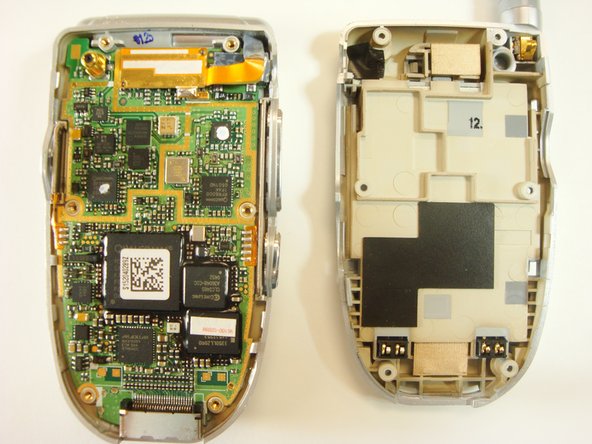
  5. LG VX6100 Keypad Replacement: 手順 5、 2の画像 1 LG VX6100 Keypad Replacement: 手順 5、 2の画像 2
    • Insert a plastic opener tool through the seam between the back case and the rest of the phone.

    • Slowly slide the tool along the seam. Lift up on the back case while you do this until the back case comes apart.

    FixBotに聞いてみる

    コメントを追加

  6. LG VX6100 Keypad Replacement, Keypad: 手順 6、 1の画像 1
    • Lift the bottom of the logic board out of the case.

    • Make sure not to lift the top of the logic board, since it is still connected to the backcase of the phone.

    FixBotに聞いてみる

    コメントを追加

  7. LG VX6100 Keypad Replacement: 手順 7、 1の画像 1
    • Gently lift up on any edge of the white keypad to remove it from the phone case.

    FixBotに聞いてみる

    コメントを追加

終わりに

To reassemble your device, follow these instructions in reverse order.

キャンセル: このガイドを終了できませんでした。

作成者

4人の作成者と共同で作成されました。

Teal

メンバー登録日: 04/17/12

1 ポイント

2のガイドは作成済み

チーム

Cal Poly, Team 12-39, Regan Spring 2012 Cal Poly, Team 12-39, Regan Spring 2012人のメンバー

CPSU-REGAN-S12S12G39

3 メンバー

16のガイドは作成済み

0件のガイドコメント

コメントを追加

統計データ:

過去 24時間: 0

過去 7 日: 4

過去 30 日: 39

今までの合計 876