メインコンテンツにスキップ
リペアコミュニティに参加 - アカウントの作成

LG Optimus L7 P705 Home Button Replacement

必要な工具と部品

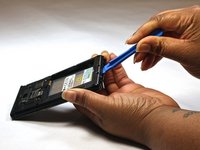
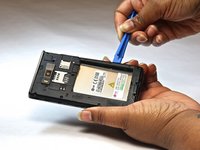
  1. LG Optimus L7 P705 Home Button Replacement, Home Button: 手順 1、 2の画像 1 LG Optimus L7 P705 Home Button Replacement, Home Button: 手順 1、 2の画像 2
    • Insert a plastic opening tool between the seams of the device and pry the back cover away from the phone.

    • Remove the battery and SIM card.

  2. LG Optimus L7 P705 Home Button Replacement: 手順 2、 1の画像 1
    • Remove the twelve screws using the Phillips 000 screwdriver.

  3. LG Optimus L7 P705 Home Button Replacement: 手順 3、 1の画像 1
    • Remove bottom plate where the charger port is located.

  4. LG Optimus L7 P705 Home Button Replacement: 手順 4、 2の画像 1 LG Optimus L7 P705 Home Button Replacement: 手順 4、 2の画像 2
    • Insert a plastic opening tool between the seams of the device and apply some pressure to lift off the cover.

  5. LG Optimus L7 P705 Home Button Replacement: 手順 5、 1の画像 1
    • Flip over to the face of the device.

    • Lift off the glass screen (display).

  6. LG Optimus L7 P705 Home Button Replacement: 手順 6、 1の画像 1
    • Remove the home screen button. Replace as needed.

終わりに

To reassemble your device, follow these instructions in reverse order.

ある他の人がこのガイドを完成しました。

作成者

5人の作成者と共同で作成されました。

Bruna

メンバー登録日: 10/08/14

525 ポイント

4のガイドは作成済み

チーム

USF Tampa, Team 9-1, Leahy Fall 2014 USF Tampa, Team 9-1, Leahy Fall 2014人のメンバー

USFT-LEAHY-F14S9G1

3 メンバー

5のガイドは作成済み

1件のガイドコメント

in the step 2, one red ring is in the wrong position.

The ring in the midle at the left side is in the center of the telephone

Tiago - 返信 共有

コメントを追加

統計データ:

過去 24時間: 2

過去 7 日: 6

過去 30 日: 16

今までの合計 1,947