メインコンテンツにスキップ
リペアコミュニティに参加 - アカウントの作成

LG Cosmos Side Case Replacement

必要な工具と部品

  1. LG Cosmos Side Case Replacement, Battery: 手順 1、 1の画像 1
    • Apply an upward force to slide the back cover off.

    FixBotに聞いてみる

    コメントを追加

  2. LG Cosmos Side Case Replacement: 手順 2、 1の画像 1
    • Use your finger to push down on the top of the battery and pull it out.

    FixBotに聞いてみる

    コメントを追加

  3. LG Cosmos Side Case Replacement, Rear Case: 手順 3、 1の画像 1
    • Remove the five 3.0mm Phillips #000 screws along the edge of the rear case.

    FixBotに聞いてみる

    コメントを追加

  4. LG Cosmos Side Case Replacement: 手順 4、 1の画像 1
    • Use a plastic opening tool to pry the rear case loose.

    FixBotに聞いてみる

    コメントを追加

  5. LG Cosmos Side Case Replacement: 手順 5、 1の画像 1
    • Once the rear case is loose, lift it from the rest of the phone.

    FixBotに聞いてみる

    コメントを追加

  6. LG Cosmos Side Case Replacement, Motherboard: 手順 6、 1の画像 1
    • Remove the two 2.9 mm Phillips #000 screws that are slightly off-centered to the right.

    FixBotに聞いてみる

    コメントを追加

  7. LG Cosmos Side Case Replacement: 手順 7、 1の画像 1
    • Use the plastic opening tool to pry the motherboard loose.

    FixBotに聞いてみる

    コメントを追加

  8. LG Cosmos Side Case Replacement: 手順 8、 1の画像 1
    • Hold the motherboard from the top and bottom and slowly lift the motherboard until you feel a pull.

    • The flex cable is attached at the bottom of the motherboard and can be damaged if too much lifting force is applied.

    FixBotに聞いてみる

    コメントを追加

  9. LG Cosmos Side Case Replacement: 手順 9、 1の画像 1
    • Once the motherboard is lifted , rotate the motherboard up 90 degrees to the right.

    FixBotに聞いてみる

    コメントを追加

  10. LG Cosmos Side Case Replacement: 手順 10、 1の画像 1
    • Use your finger to pull the flex cable out from its connector.

    FixBotに聞いてみる

    コメントを追加

  11. LG Cosmos Side Case Replacement: 手順 11、 1の画像 1
    • Pull the motherboard away from the rest of the phone.

    FixBotに聞いてみる

    コメントを追加

  12. LG Cosmos Side Case Replacement, Silicon Keypad: 手順 12、 1の画像 1
    • Lift the silicon keypad away from the rest of the phone.

    FixBotに聞いてみる

    コメントを追加

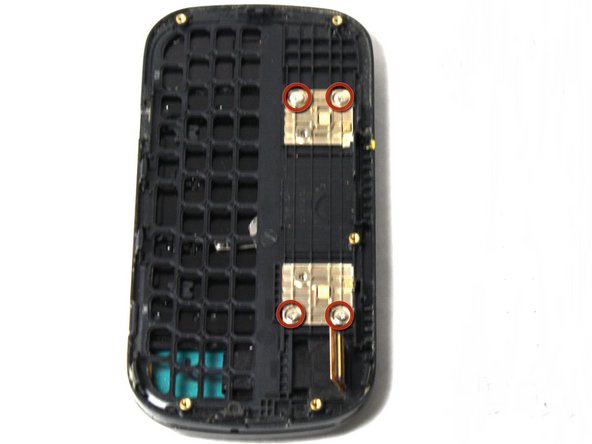
  13. LG Cosmos Side Case Replacement, Side Case: 手順 13、 1の画像 1
    • Remove the four 2.0mm Phillips #000 screws on the golden squares.

    FixBotに聞いてみる

    コメントを追加

  14. LG Cosmos Side Case Replacement: 手順 14、 1の画像 1
    • Slowly lift the side case away from the rest of the phone.

    • The flex cable can be torn if it is caught on the frame of the side case.

    FixBotに聞いてみる

    コメントを追加

終わりに

To reassemble your device, follow these instructions in reverse order.

キャンセル: このガイドを終了できませんでした。

作成者

3人の作成者と共同で作成されました。

Johnny Phane

メンバー登録日: 04/15/13

91 ポイント

5のガイドは作成済み

チーム

Cal Poly, Team 13-63, Johann Spring 2013 Cal Poly, Team 13-63, Johann Spring 2013人のメンバー

CPSU-JOHANN-S13S13G63

3 メンバー

14のガイドは作成済み

0件のガイドコメント

コメントを追加

統計データ:

過去 24時間: 1

過去 7 日: 7

過去 30 日: 35

今までの合計 1,297