はじめに
- In this tutorial you will learn how to take out and replace a keyswitch PROPERLY and not damage the pins. You need a keyswitch remover and a keycap puller though.
-
-
First you are gonna want to grab a keycap puller/remover.
 FixBotに聞いてみる
-
-
-
Do what the video depicts. Pull of the keycap with the keycap remover
-
-
-
-
There are 2 grooves on the sides of the keyswitch. Your keyswitch will still be in the keyboard, but I took mine out to show them closer.
-
-
-
Grab the 2 grooves with the keyswitch remover like I did. It is important you pull straight up otherwise you could damage our break the pin, which is bad. It may require some force.
-
-
-
Grab your new keyswitch, you don't need the old one anymore. Now first you want to make sure you have the proper amount of pins. For example my keyboard has two and the keyswitch also has 2.
-
-
-
Grab your new keyswitch and line up the pins with the holes in the keyboard. Press firmly and it should pop into place. It may require a bit of force, but you could have also lined up the pins wrong so always double check. It should not wiggle at all, it should be firm and sending signals.
-
-
-
The keycap and keyswitch both have the cross hole. They should line up when installing.
-
-
-
The keycap should just pop on and it should fit. Make sure that its facing the right way and in the correct position. Now you are finished! it should click, sound and send signals like all the other ones (considering you are replacing all of them, if not it still should send signals and sound and click like the other new ones.)
-


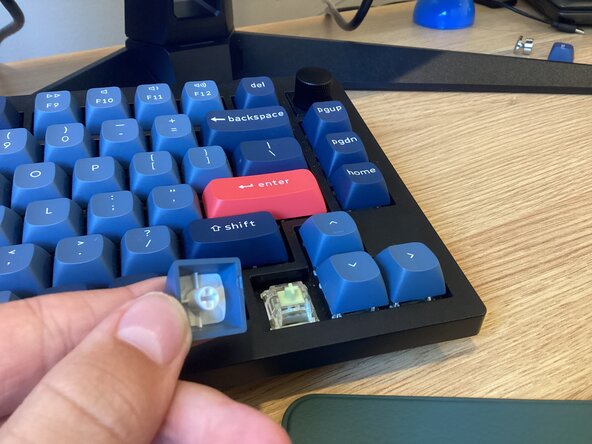
Just rinse and repeat for all the keys you need replaced!
ある他の人がこのガイドを完成しました。

