メインコンテンツにスキップ
リペアコミュニティに参加 - アカウントの作成

Jabra Elite 85h Microphone Replacement

必要な工具と部品

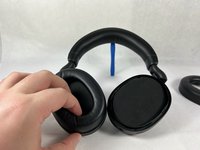
    1. Jabra Elite 85h Microphone Replacement, Ear Cushion: 手順 1、 3の画像 1 Jabra Elite 85h Microphone Replacement, Ear Cushion: 手順 1、 3の画像 2 Jabra Elite 85h Microphone Replacement, Ear Cushion: 手順 1、 3の画像 3
      • Remove each ear cushion by hooking your fingers along the inside of the ear cushion and pulling up and away from the ear cup.

      • If the cushion does not fully release, move your hand to the opposite side and pull up inn the same manner.

      FixBotに聞いてみる

      コメントを追加

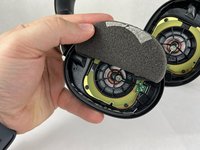
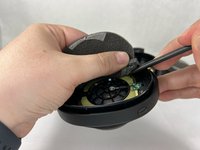
    1. Jabra Elite 85h Microphone Replacement, Speaker: 手順 2、 3の画像 1 Jabra Elite 85h Microphone Replacement, Speaker: 手順 2、 3の画像 2 Jabra Elite 85h Microphone Replacement, Speaker: 手順 2、 3の画像 3
      • The foam inserts and backing tape are very delicate. Take your time when removing them, and be careful to not rip or tear the material.

      • Using the small plastic spudger to assist, begin lifting up and removing the foam inserts with attached backing tape.

      FixBotに聞いてみる

      コメントを追加

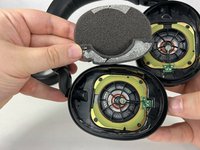
    2. Jabra Elite 85h Microphone Replacement: 手順 3、 3の画像 1 Jabra Elite 85h Microphone Replacement: 手順 3、 3の画像 2 Jabra Elite 85h Microphone Replacement: 手順 3、 3の画像 3
      • Repeat the previous steps for the other side, removing the foam inserts with care.

      FixBotに聞いてみる

      コメントを追加

    3. Jabra Elite 85h Microphone Replacement: 手順 4、 1の画像 1
      • Unscrew and remove the four T6 screws holding the speaker in place.

      FixBotに聞いてみる

      コメントを追加

    4. Jabra Elite 85h Microphone Replacement: 手順 5、 1の画像 1
      • Repeat the previous step for the other side, removing the four T6 screws.

      FixBotに聞いてみる

      コメントを追加

    5. Jabra Elite 85h Microphone Replacement: 手順 6、 1の画像 1
      • Tilt the headphones over so that the speaker tilts out of the plastic holder.

      • Repeat for both sides.

      FixBotに聞いてみる

      コメントを追加

    1. Jabra Elite 85h Microphone Replacement, Microphone: 手順 7、 2の画像 1 Jabra Elite 85h Microphone Replacement, Microphone: 手順 7、 2の画像 2
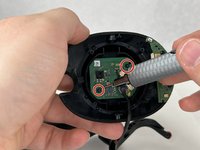
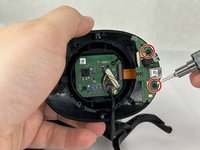
      • Remove the four screws attaching the circuit boards to the headphone enclosure.

      • The microphone is located on the lower circuit board.

      FixBotに聞いてみる

      コメントを追加

    2. Jabra Elite 85h Microphone Replacement: 手順 8、 3の画像 1 Jabra Elite 85h Microphone Replacement: 手順 8、 3の画像 2 Jabra Elite 85h Microphone Replacement: 手順 8、 3の画像 3
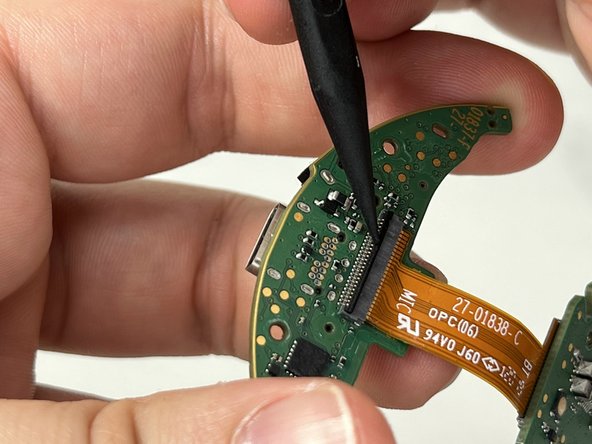
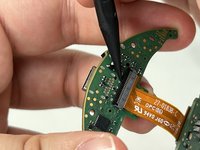
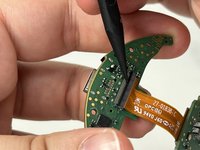
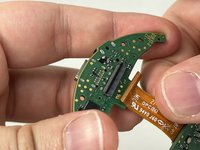
      • Remove the circuit boards from the headphone enclosure.

      • Carefully lift the bar located on the lower circuit board that contains the 24-pin ribbon cable. Remove the cable.

      FixBotに聞いてみる

      コメントを追加

終わりに

If the microphone on your Jabra Elite 85h is not working, replacement could be an appropriate solution.

キャンセル: このガイドを終了できませんでした。

ある他の人がこのガイドを完成しました。

作成者

1人の作成者と共同作成されました。

Ryan Callaghan

メンバー登録日: 03/13/23

989 ポイント

4のガイドは作成済み

チーム

UMass Dartmouth, Team 3-4, Petersen Spring 2023 UMass Dartmouth, Team 3-4, Petersen Spring 2023人のメンバー

UMASSD-PETERSEN-S23S3G4

4 メンバー

24のガイドは作成済み

0件のガイドコメント

コメントを追加

統計データ:

過去 24時間: 2

過去 7 日: 6

過去 30 日: 31

今までの合計 1,817