メインコンテンツにスキップ
リペアコミュニティに参加 - アカウントの作成

IBM ThinkPad T41 Motherboard Replacement

必要な工具と部品

  1. IBM ThinkPad T41 Motherboard Replacement, Keyboard: 手順 1、 1の画像 1
    • Close the screen and turn the closed laptop over.

    • Remove all 17 screws on the bottom of the computer.

    • The multiple colors (turquoise, red, blue, orange, yellow, and purple) are for organizational purposes, indicating different screws.

    • The yellow marker at the rear denotes the UltraBay device retaining screw. This screw is optional as the UltraBay mechanism will hold the drive or battery in place anyway. The yellow marker at the front denotes the hard disk caddy retaining screw.

    FixBotに聞いてみる
  2. IBM ThinkPad T41 Motherboard Replacement: 手順 2、 1の画像 1
    • Remove the extra RAM cover, by lifting where the screw was and pulling out.

    FixBotに聞いてみる
  3. IBM ThinkPad T41 Motherboard Replacement: 手順 3、 1の画像 1
    • Turn the laptop right side up and open the screen.

    • Lift the keyboard, using a spudger at the seam between the keyboard and trackpad.

    • Careful of the ribbon cable underneath, which may tear if the keyboard is lifted too vigorously.

    FixBotに聞いてみる
  4. IBM ThinkPad T41 Motherboard Replacement: 手順 4、 1の画像 1
    • Unplug the keyboard’s ribbon cable, by lifting up the edges of the plug.

    • Remove the keyboard.

    FixBotに聞いてみる
  5. IBM ThinkPad T41 Motherboard Replacement, Trackpad: 手順 5、 1の画像 1
    • Close the laptop and turn it over.

    • Remove the five plastic stickers covering the screws on the front edge of the case.

    • In order to reuse the stickers, remove them carefully.

    FixBotに聞いてみる
  6. IBM ThinkPad T41 Motherboard Replacement: 手順 6、 1の画像 1
    • Unscrew the five screws that were hidden by the stickers.

    FixBotに聞いてみる
  7. IBM ThinkPad T41 Motherboard Replacement: 手順 7、 1の画像 1
    • Turn the computer right side up and open the screen.

    • Lift the trackpad assembly by placing hands on both edges and then pull towards you till it is free of the case.

    • Be careful of the ribbon cable underneath. It may tear if the trackpad is pulled too vigorously.

    FixBotに聞いてみる
  8. IBM ThinkPad T41 Motherboard Replacement: 手順 8、 1の画像 1
    • Unplug the trackpad’s ribbon cable by pulling on the white plastic tab.

    FixBotに聞いてみる
  9. IBM ThinkPad T41 Motherboard Replacement, RAM: 手順 9、 1の画像 1
    • Push apart the retaining clips on the RAM.

    • Note: The RAM should pop up a little bit.

    FixBotに聞いてみる
  10. IBM ThinkPad T41 Motherboard Replacement: 手順 10、 1の画像 1
    • Lift out the RAM chip.

    FixBotに聞いてみる
  11. IBM ThinkPad T41 Motherboard Replacement, Wireless Network Card: 手順 11、 1の画像 1
    • Pull off the one black and one white coaxial cables by lifting the tabs labeled main and aux (for auxiliary).

    FixBotに聞いてみる
  12. IBM ThinkPad T41 Motherboard Replacement: 手順 12、 1の画像 1
    • Push apart the retaining clips.

    • Note: The card should pop up a little bit.

    FixBotに聞いてみる
  13. IBM ThinkPad T41 Motherboard Replacement: 手順 13、 1の画像 1
    • Pull the wireless network card out.

    FixBotに聞いてみる
  14. IBM ThinkPad T41 Motherboard Replacement, CMOS Battery: 手順 14、 1の画像 1
    • Lift the yellow plastic-covered battery up.

    FixBotに聞いてみる
  15. IBM ThinkPad T41 Motherboard Replacement: 手順 15、 1の画像 1
    • Unplug the battery connector.

    FixBotに聞いてみる
  16. IBM ThinkPad T41 Motherboard Replacement, Speakers: 手順 16、 1の画像 1
    • Lift the speakers out by starting with the left end and then unsnake the wires.

    FixBotに聞いてみる
  17. IBM ThinkPad T41 Motherboard Replacement: 手順 17、 1の画像 1
    • Unplug the wires from the motherboard.

    FixBotに聞いてみる
  18. IBM ThinkPad T41 Motherboard Replacement, Expansion Slot: 手順 18、 1の画像 1
    • Remove the screw on the left hand side of the case, above the expansion slot.

    FixBotに聞いてみる
  19. IBM ThinkPad T41 Motherboard Replacement: 手順 19、 2の画像 1 IBM ThinkPad T41 Motherboard Replacement: 手順 19、 2の画像 2
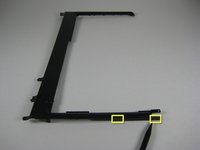
    • Lift the black plastic border by lifting on either side.

    • Once the sides are up, pull the border towards you and away from the screen.

    • When lifting up, there are two pairs of plastic clips hooking into the fan grill. If you pull hard enough the border will come away, but it's better to push the clips with the spudger.

    FixBotに聞いてみる
  20. IBM ThinkPad T41 Motherboard Replacement: 手順 20、 1の画像 1
    • Pull the sheet metal cover away from slot.

    FixBotに聞いてみる
  21. IBM ThinkPad T41 Motherboard Replacement: 手順 21、 1の画像 1
    • Lift out the expansion slot by starting at the entrance hole and pulling upward.

    • Note: Try wiggling the slot from side to side until it comes out all the way.

    FixBotに聞いてみる
  22. IBM ThinkPad T41 Motherboard Replacement, Modem: 手順 22、 1の画像 1
    • Remove the three screws holding down the modem in the upper left corner of the laptop.

    FixBotに聞いてみる
  23. IBM ThinkPad T41 Motherboard Replacement: 手順 23、 1の画像 1
    • Lift the modem up, unplugging it from the motherboard as you lift.

    FixBotに聞いてみる
  24. IBM ThinkPad T41 Motherboard Replacement: 手順 24、 2の画像 1 IBM ThinkPad T41 Motherboard Replacement: 手順 24、 2の画像 2
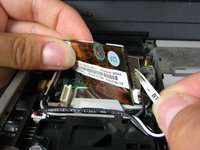
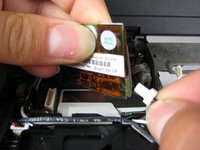
    • Pull out the wire that connects the modem to the screen.

    • Unplug the other cable that attaches the modem to the motherboard

    FixBotに聞いてみる
  25. IBM ThinkPad T41 Motherboard Replacement, Screen: 手順 25、 1の画像 1
    • Close the computer screen.

    • Remove the four screws on the back of the laptop, near the right and left hinges.

    FixBotに聞いてみる
  26. IBM ThinkPad T41 Motherboard Replacement: 手順 26、 1の画像 1
    • Open the laptop screen.

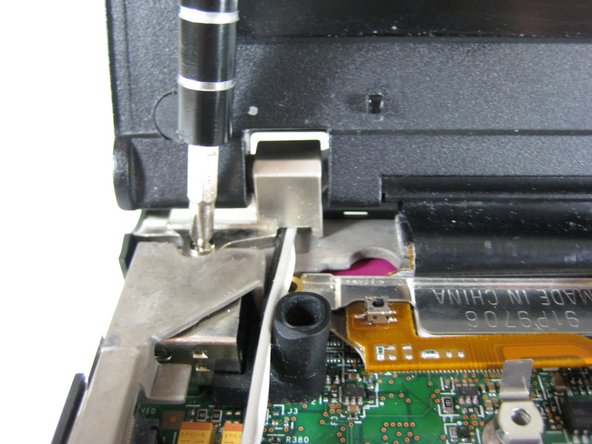
    • Remove the single screw that secures the left hinge to top of the computer.

    FixBotに聞いてみる
  27. IBM ThinkPad T41 Motherboard Replacement: 手順 27、 1の画像 1
    • Remove a single screw from the metal plate that secures the display cable.

    FixBotに聞いてみる
  28. IBM ThinkPad T41 Motherboard Replacement: 手順 28、 1の画像 1
    • Pull the metal plate away from the display cable.

    FixBotに聞いてみる
  29. IBM ThinkPad T41 Motherboard Replacement: 手順 29、 1の画像 1
    • Disconnect the display cable.

    FixBotに聞いてみる
  30. IBM ThinkPad T41 Motherboard Replacement: 手順 30、 1の画像 1
    • Carefully pull up the long antenna cables that were attached to the wireless network card.

    FixBotに聞いてみる
  31. IBM ThinkPad T41 Motherboard Replacement: 手順 31、 1の画像 1
    • Lift out the screen.

    FixBotに聞いてみる
  32. IBM ThinkPad T41 Motherboard Replacement, Fan: 手順 32、 1の画像 1
    • Unsnake the black cable from the black plastic frame.

    FixBotに聞いてみる
  33. IBM ThinkPad T41 Motherboard Replacement: 手順 33、 1の画像 1
    • Remove the sheet metal piece, which was underneath the modem.

    FixBotに聞いてみる
  34. IBM ThinkPad T41 Motherboard Replacement: 手順 34、 1の画像 1
    • Remove the rubber microphone cover in the upper left hand corner by lifting up the gray metal frame.

    FixBotに聞いてみる
  35. IBM ThinkPad T41 Motherboard Replacement: 手順 35、 1の画像 1
    • Lift away the gray metal frame.

    FixBotに聞いてみる
  36. IBM ThinkPad T41 Motherboard Replacement: 手順 36、 1の画像 1
    • Remove three screws near the edge of the computer, holding the optical bay and HDD covers.

    • Remove three other screws on the other side of the covers.

    • You should have six screws in total, three of one size and three of another size.

    FixBotに聞いてみる
  37. IBM ThinkPad T41 Motherboard Replacement: 手順 37、 1の画像 1
    • Lift out the optical bay and HDD covers.

    FixBotに聞いてみる
  38. IBM ThinkPad T41 Motherboard Replacement: 手順 38、 1の画像 1
    • Lift out the black plastic frame.

    FixBotに聞いてみる
  39. IBM ThinkPad T41 Motherboard Replacement: 手順 39、 1の画像 1
    • Unplug the fan from the motherboard.

    FixBotに聞いてみる
  40. IBM ThinkPad T41 Motherboard Replacement: 手順 40、 1の画像 1
    • Remove the three screws on the fan.

    FixBotに聞いてみる
  41. IBM ThinkPad T41 Motherboard Replacement: 手順 41、 1の画像 1
    • Lift the fan out.

    FixBotに聞いてみる
  42. IBM ThinkPad T41 Motherboard Replacement, CPU: 手順 42、 1の画像 1
    • Turn the CPU retaining screw 90 degrees counterclockwise.

    • Carefully pull the CPU out of its socket.

    FixBotに聞いてみる
  43. IBM ThinkPad T41 Motherboard Replacement, Motherboard: 手順 43、 1の画像 1
    • Remove the two screws in the upper right corner that secure the gray metal frame.

    FixBotに聞いてみる
  44. IBM ThinkPad T41 Motherboard Replacement: 手順 44、 1の画像 1
    • Unplug the small ribbon cable attached to the motherboard.

    FixBotに聞いてみる
  45. IBM ThinkPad T41 Motherboard Replacement: 手順 45、 1の画像 1
    • Remove the single screw located next to the USB slots.

    FixBotに聞いてみる
  46. IBM ThinkPad T41 Motherboard Replacement: 手順 46、 1の画像 1
    • Rotate the device so that the front faces you.

    • Lift the entire motherboard assembly out of the case.

    FixBotに聞いてみる
  47. IBM ThinkPad T41 Motherboard Replacement: 手順 47、 1の画像 1
    • Disconnect the power connector from the motherboard.

    FixBotに聞いてみる
  48. IBM ThinkPad T41 Motherboard Replacement: 手順 48、 1の画像 1
    • Using a nut driver or a pair of thin nose pliers, remove the two stand off screws next to the pink parallel port on the back of the computer.

    FixBotに聞いてみる
  49. IBM ThinkPad T41 Motherboard Replacement: 手順 49、 1の画像 1
    • Lift up the outer end of the grey metal frame.

    • Carefully rotate the frame clockwise to release it from the motherboard.

    FixBotに聞いてみる
終わりに

To reassemble your device, follow these instructions in reverse order.

20 の人々がこのガイドを完成させました。

作成者

8人の作成者と共同で作成されました。

Marissa Blustein

メンバー登録日: 04/16/10

543 ポイント

12のガイドは作成済み

チーム

Cal Poly, Team 7-8, Maness Spring 2010 Cal Poly, Team 7-8, Maness Spring 2010人のメンバー

CPSU-MANESS-S10S7G8

4 メンバー

29のガイドは作成済み

6件のガイドコメント

Hello,

Thanks for this !

When assembling again, I noticed that at the contact between the micro-processor and the cooler the thermal paste there was a very small amount of thermal paste.

I had none to add, therefore I reassembled as is.

After starting the machine again I note that the cooling fan never stops.

I suggest that at reassembling should thermal paste added.

Philippe - 返信 共有

ibm thinkpad t42 laptop driver are not download please sir my laptop motherboard information send in my email id . how can download driver download for ibm laptop

Himanshu Kumar - 返信 共有

Excellent tutorial. Thank you.

genese_cranford - 返信 共有

thanks alot!

Geburtswehe - 返信 共有

It’s tempting to try, but I’d feel much braver with a reassembly tutorial!

Christine Segatti - 返信 共有

コメントを追加

統計データ:

過去 24時間: 3

過去 7 日: 20

過去 30 日: 125

今までの合計 51,115