メインコンテンツにスキップ
リペアコミュニティに参加 - アカウントの作成

Huawei Watch Jewel Strap Replacement

必要な工具と部品

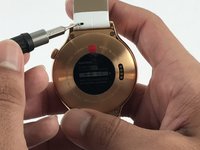
    1. Huawei Watch Jewel Strap Replacement, Strap: 手順 1、 2の画像 1 Huawei Watch Jewel Strap Replacement, Strap: 手順 1、 2の画像 2
      • Begin by laying the watch on a flat, smooth surface.

      • This will prevent the watch screen from suffering damage.

      • Obtain a Flex Extension with a Size 1.0 mm flat-head. In the case of not having said tool, for this model of watch one can use the hands to replace the strap.

      FixBotに聞いてみる

      コメントを追加

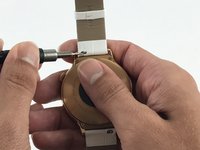
    2. Huawei Watch Jewel Strap Replacement: 手順 2、 2の画像 1 Huawei Watch Jewel Strap Replacement: 手順 2、 2の画像 2
      • Locate the two springs on the back of your watch.

      • The watch comes with two of these springs on each side of the back-face. These are used to release the straps from the body of the watch.

      FixBotに聞いてみる

      コメントを追加

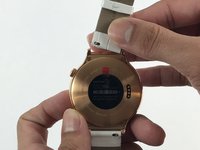
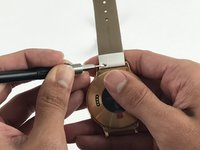
    3. Huawei Watch Jewel Strap Replacement: 手順 3、 3の画像 1 Huawei Watch Jewel Strap Replacement: 手順 3、 3の画像 2 Huawei Watch Jewel Strap Replacement: 手順 3、 3の画像 3
      • Use the Flex Extension to push the spring to the right. This will release the strap from the watch head.

      FixBotに聞いてみる

      コメントを追加

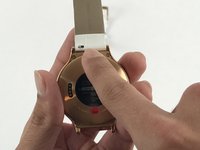
    4. Huawei Watch Jewel Strap Replacement: 手順 4、 1の画像 1
      • Carefully pull the strap away from the watch.

      FixBotに聞いてみる

      コメントを追加

    5. Huawei Watch Jewel Strap Replacement: 手順 5、 2の画像 1 Huawei Watch Jewel Strap Replacement: 手順 5、 2の画像 2
      • Repeat step 3, this time using the other strap.

      FixBotに聞いてみる

      コメントを追加

終わりに

To reassemble your device, follow these instructions in reverse order.

キャンセル: このガイドを終了できませんでした。

ある他の人がこのガイドを完成しました。

作成者

3人の作成者と共同で作成されました。

Alejandro Hernandez

メンバー登録日: 02/15/17

387 ポイント

1ガイドが承認済み

チーム

USF Tampa, Team 5-3, Passmore Spring 2017 USF Tampa, Team 5-3, Passmore Spring 2017人のメンバー

USFT-PASSMORE-S17S5G3

4 メンバー

3のガイドは作成済み

0件のガイドコメント

コメントを追加

統計データ:

過去 24時間: 1

過去 7 日: 9

過去 30 日: 23

今までの合計 1,139