メインコンテンツにスキップ
リペアコミュニティに参加 - アカウントの作成

HP Z2 Mini G3 Motherboard Replacement

必要な工具と部品

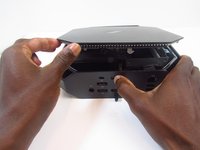
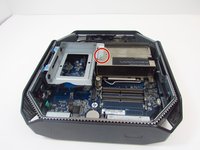
  1. HP Z2 Mini G3 Motherboard Replacement, Access Panel: 手順 1、 1の画像 1
    • Turn the device so the back-side of the device is facing you.

    • Be sure that the power is off and the A/C power cord has been disconnected before starting. Removing hardware while the power is on could damage the device or harm yourself.

    • Components of the device are subject to static damage. Work on a hard, grounded surface to prevent damage to the workstation.

    FixBotに聞いてみる
    コメントを追加

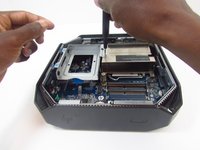
  2. HP Z2 Mini G3 Motherboard Replacement: 手順 2、 2の画像 1 HP Z2 Mini G3 Motherboard Replacement: 手順 2、 2の画像 2
    • Slide and hold the latch in the direction of the engraved arrow (to the right).

    FixBotに聞いてみる

    コメントを追加

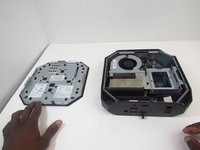
  3. HP Z2 Mini G3 Motherboard Replacement: 手順 3、 2の画像 1 HP Z2 Mini G3 Motherboard Replacement: 手順 3、 2の画像 2
    • While holding the latch, lift the access panel upwards and towards yourself and set it aside upside-down.

    FixBotに聞いてみる

    コメントを追加

  4. HP Z2 Mini G3 Motherboard Replacement, CPU Fan: 手順 4、 1の画像 1
    • Rotate the device so the front side is facing you (the side with the power button) and locate the CPU fan.

    FixBotに聞いてみる

    コメントを追加

  5. HP Z2 Mini G3 Motherboard Replacement: 手順 5、 1の画像 1
    • Swing the fan upward, to a 90-degree angle.

    FixBotに聞いてみる

    コメントを追加

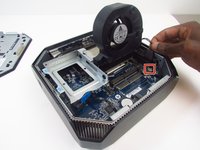
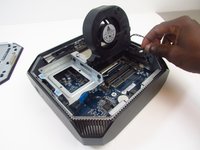
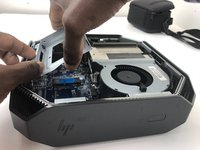
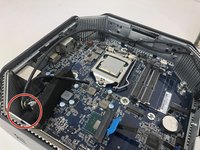
  6. HP Z2 Mini G3 Motherboard Replacement: 手順 6、 2の画像 1 HP Z2 Mini G3 Motherboard Replacement: 手順 6、 2の画像 2
    • Carefully disconnect the CPU fan by pulling out the wires from the motherboard.

    FixBotに聞いてみる
    コメントを追加

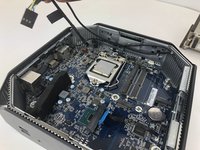
  7. HP Z2 Mini G3 Motherboard Replacement: 手順 7、 1の画像 1
    • Swing the fan back down and carefully unhook the CPU fan notches by pulling each tab away from the heat sink holes.

    FixBotに聞いてみる
    コメントを追加

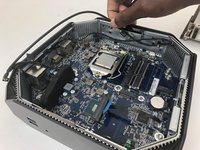
  8. HP Z2 Mini G3 Motherboard Replacement: 手順 8、 1の画像 1
    • Swing the fan up again and pull it out.

    FixBotに聞いてみる
    コメントを追加

  9. HP Z2 Mini G3 Motherboard Replacement, CPU Processor: 手順 9、 3の画像 1 HP Z2 Mini G3 Motherboard Replacement, CPU Processor: 手順 9、 3の画像 2 HP Z2 Mini G3 Motherboard Replacement, CPU Processor: 手順 9、 3の画像 3
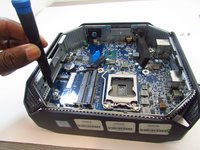
    • Remove the 9mm Torx screw with a T15 Torx screwdriver to release the SSD assembly.

    • Lift the assembly upwards to remove it.

    FixBotに聞いてみる

    コメントを追加

  10. HP Z2 Mini G3 Motherboard Replacement: 手順 10、 1の画像 1
    • Pull the metal arm out from under the frame and lift it up. The frame should slide back from under the screw.

    FixBotに聞いてみる

    コメントを追加

  11. HP Z2 Mini G3 Motherboard Replacement: 手順 11、 2の画像 1 HP Z2 Mini G3 Motherboard Replacement: 手順 11、 2の画像 2
    • Lift the frame upward to gain access to the processor

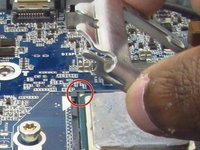
    • Take note of a triangular mark on one of the corners of the processor and bracket it is mounted on. The triangles must be aligned together during reassembly.

    FixBotに聞いてみる

    コメントを追加

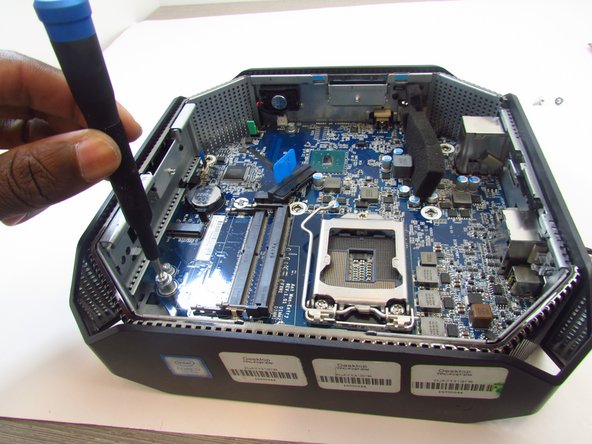
  12. HP Z2 Mini G3 Motherboard Replacement: 手順 12、 1の画像 1
    • Grip the processor on each side, carefully lifting it up.

    • Do not touch the underside of the processor. Doing so may damage the processor and prevent a connection to the motherboard.

    • Be careful inserting the new processor. The connectors on the new one and the motherboard are fragile and damage easily.

    FixBotに聞いてみる
    コメントを追加

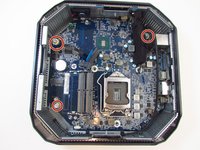
  13. HP Z2 Mini G3 Motherboard Replacement, Motherboard: 手順 13、 3の画像 1 HP Z2 Mini G3 Motherboard Replacement, Motherboard: 手順 13、 3の画像 2 HP Z2 Mini G3 Motherboard Replacement, Motherboard: 手順 13、 3の画像 3
    • Remove the thermal sensor cable from the motherboard.

    • Grab and lift the cable from the chassis to finish removing the thermal sensor.

    FixBotに聞いてみる
    コメントを追加

  14. HP Z2 Mini G3 Motherboard Replacement: 手順 14、 1の画像 1
    • Some models may have a wireless LAN module installed under the GPU fan.

    • In this case, use a T15 Torx screwdriver to remove the 9mm Torx screw from the module and take the component out.

    FixBotに聞いてみる

    コメントを追加

  15. HP Z2 Mini G3 Motherboard Replacement: 手順 15、 1の画像 1
    • Unplug, then carefully detach the system speaker from the chassis by gripping the frame and pulling back.

    • You do not need to remove the speaker from its frame.

    FixBotに聞いてみる

    コメントを追加

  16. HP Z2 Mini G3 Motherboard Replacement: 手順 16、 2の画像 1 HP Z2 Mini G3 Motherboard Replacement: 手順 16、 2の画像 2
    • Use a T15 Torx screw driver to remove the 9mm and the two 16mm Torx head screws that secure the motherboard to the chassis.

    FixBotに聞いてみる

    コメントを追加

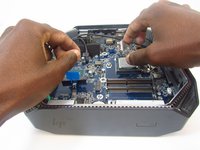
  17. HP Z2 Mini G3 Motherboard Replacement: 手順 17、 2の画像 1 HP Z2 Mini G3 Motherboard Replacement: 手順 17、 2の画像 2
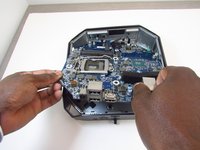
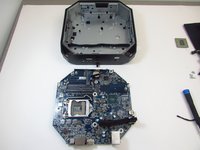
    • Slide the motherboard forward and to the left to clear it from chassis.

    • Carefully pull and lift the motherboard out by holding on to the ports.

    FixBotに聞いてみる

    コメントを追加

終わりに

To reassemble your device, follow these instructions in reverse order.

キャンセル: このガイドを終了できませんでした。

2 の人々がこのガイドを完成させました。

作成者

4人の作成者と共同で作成されました。

Sympson Placide

メンバー登録日: 01/14/20

315 ポイント

2のガイドは作成済み

0件のガイドコメント

コメントを追加

統計データ:

過去 24時間: 2

過去 7 日: 23

過去 30 日: 86

今までの合計 3,874