メインコンテンツにスキップ
リペアコミュニティに参加 - アカウントの作成

HP Compaq nc8430 Spacebar Replacement

必要な工具と部品

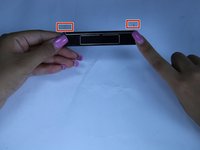
    1. HP Compaq nc8430 Spacebar Replacement, Spacebar: 手順 1、 1の画像 1
      • slide the latch to the right

      • slowly raise screen up

      FixBotに聞いてみる

      コメントを追加

    2. HP Compaq nc8430 Spacebar Replacement: 手順 2、 3の画像 1 HP Compaq nc8430 Spacebar Replacement: 手順 2、 3の画像 2 HP Compaq nc8430 Spacebar Replacement: 手順 2、 3の画像 3
      • Place a plastic opening tool, under the edge of the space bar and gently pry up to release the spacebar.

      FixBotに聞いてみる

      コメントを追加

    3. HP Compaq nc8430 Spacebar Replacement: 手順 3、 2の画像 1 HP Compaq nc8430 Spacebar Replacement: 手順 3、 2の画像 2
      • observe the long metal rod attached to the bottom of the space bar

      • unhook the ends of the metal rod from the keyboard, completely removing the space bar key

      • if you notice any dust, dip a cotton swab in alcohol and clean the area under the space bar

      FixBotに聞いてみる

      コメントを追加

終わりに

To reassemble your device, follow these instructions in reverse order.

キャンセル: このガイドを終了できませんでした。

ある他の人がこのガイドを完成しました。

作成者

2人の作成者と共同で作成されました。

Andres Castro

メンバー登録日: 03/20/17

160 ポイント

1ガイドが承認済み

チーム

Texas Tech, Team S13-G4, Bennett Spring 2017 Texas Tech, Team S13-G4, Bennett Spring 2017人のメンバー

TTU-BENNETT-S17S13G4

5 メンバー

11のガイドは作成済み

0件のガイドコメント

コメントを追加

統計データ:

過去 24時間: 4

過去 7 日: 6

過去 30 日: 22

今までの合計 688