メインコンテンツにスキップ
リペアコミュニティに参加 - アカウントの作成

HP Compaq 6710b Wireless Card Replacement

必要な工具と部品

  1. HP Compaq 6710b Wireless Card Replacement, Battery: 手順 1、 1の画像 1
    • Turn off your computer! Taking out the battery while it's still on is dangerous!

    • Flip the laptop over to the back.

    • Using two hands, push on the tabs while gently taking out the battery.

    FixBotに聞いてみる

    コメントを追加

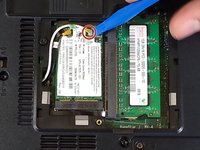
  2. HP Compaq 6710b Wireless Card Replacement, Wireless Card: 手順 2、 2の画像 1 HP Compaq 6710b Wireless Card Replacement, Wireless Card: 手順 2、 2の画像 2
    • Make sure the computer is off.

    • Using a Phillips #1, unscrew the 5mm screw on the bottom of the laptop

    • Remove the back cover plate.

    • The cover has popping tabs so it might require a small amount of force to remove.

    FixBotに聞いてみる

    コメントを追加

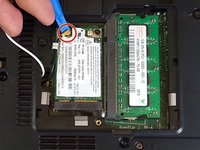
  3. HP Compaq 6710b Wireless Card Replacement: 手順 3、 2の画像 1 HP Compaq 6710b Wireless Card Replacement: 手順 3、 2の画像 2
    • Using a blue plastic prying tool, gently pry off the 2 connectors.

    • The black cable goes on the connection closer to where the cables originate, while the white cable goes on the farther connection.

    FixBotに聞いてみる

    コメントを追加

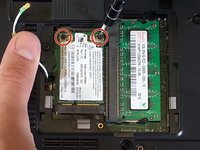
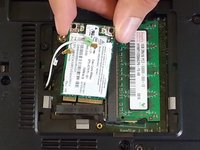
  4. HP Compaq 6710b Wireless Card Replacement: 手順 4、 2の画像 1 HP Compaq 6710b Wireless Card Replacement: 手順 4、 2の画像 2
    • Using the Phillips #1 screwdriver, unscrew the 2 3mm screws.

    • Adaptor is spring-loaded.

    • You can now take out the adaptor.

    FixBotに聞いてみる

    コメントを追加

終わりに

To reassemble your device, follow these instructions in reverse order.

キャンセル: このガイドを終了できませんでした。

3 の人々がこのガイドを完成させました。

作成者

4人の作成者と共同で作成されました。

Khulan Orgil

メンバー登録日: 04/14/15

1,186 ポイント

6のガイドは作成済み

チーム

Cal Poly, Team 4-2, Maness Spring 2015 Cal Poly, Team 4-2, Maness Spring 2015人のメンバー

CPSU-MANESS-S15S4G2

4 メンバー

6のガイドは作成済み

0件のガイドコメント

コメントを追加

統計データ:

過去 24時間: 0

過去 7 日: 8

過去 30 日: 40

今までの合計 3,047