はじめに
Removing the keyboard takes some patience but it isn't outrageously difficult. The only tools needed for this replacement guide are the PH1 screwdriver bit and the plastic spudger. Make sure to keep the two screws that are removed in a safe place so you don't lose them. Make sure the device is off before starting this guide. Be careful to not be too aggressive with the keyboard, it does take some force to separate it from the rest of the device but try to still be as gentle as possible.
必要な工具と部品
-
-
Turn the laptop over, the screws for the keyboard are in the middle and left of the device
 FixBotに聞いてみる
-
-
-
-
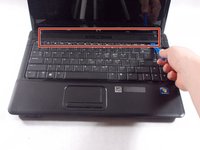
Gently use a plastic spudger to remove the plastic holder at the top of the keyboard
-
-
-
Carefully unclip and remove the large black wire that is connecting the keyboard to the laptop
-


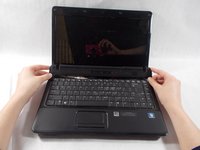


To reassemble your device, follow these instructions in reverse order.

チーム

UMass Dartmouth, Team S4-G1, Covino Spring 2018 UMass Dartmouth, Team S4-G1, Covino Spring 2018人のメンバー
UMASSD-COVINO-S18S4G1
3 メンバー
5のガイドは作成済み
