はじめに
This guide will walk you through the process of replacing a button on the Forerunner 405.
必要な工具と部品
-
-
-
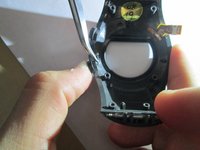
Unscrew the four 6.35 mm Torx T5 screws securing the backing of the watch.
 FixBotに聞いてみる
-
-
-
-
Unscrew one 4 mm philips screw that attaches the motherboard using a PH000 screwdriver.
-
Lift the motherboard out of the watch.
-
-
この手順で使用する道具:Tweezers$4.99
-
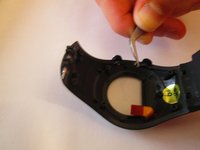
Push button in and pinch silver clip with tweezers.
-
Pull silver clip off the pin it is on.
-
Pull out button and replace.
-
-


To reassemble your device, follow these instructions in reverse order.

チーム

USF Sarasota-Manatee, Team 1-4, Stewart Fall 2014 USF Sarasota-Manatee, Team 1-4, Stewart Fall 2014人のメンバー
USFSM-STEWART-F14S1G4
4 メンバー
27のガイドは作成済み
2件のガイドコメント
Where to find repair button for FR60? Can it be 3d printed? Garmin asks too much out-of-warranty
vasiljevicic - 返信 共有
I took mine apart to find that the jammed button was actually bent. Using two pairs of needle-nose pliers, I was able to straighten it and re-use it. The watch works great now.
