メインコンテンツにスキップ

Game Boy Micro Battery Replacement

必要な工具と部品

  1. Game Boy Micro Battery Replacement, Remove the Cover: 手順 1、 2の画像 1 Game Boy Micro Battery Replacement, Remove the Cover: 手順 1、 2の画像 2
    • Remove the Phillips #00 screw on the side of the Game Boy closest to the directional pad.

    • Once the screw has been loosened, lift the cover off the back of the device.

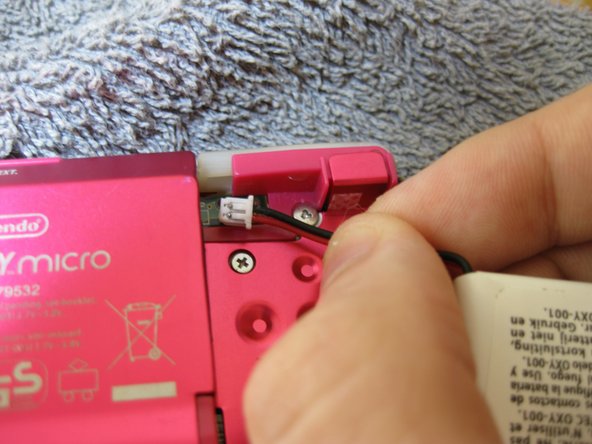
  2. Game Boy Micro Battery Replacement, Remove battery: 手順 2、 3の画像 1 Game Boy Micro Battery Replacement, Remove battery: 手順 2、 3の画像 2 Game Boy Micro Battery Replacement, Remove battery: 手順 2、 3の画像 3
    • Grip, and gently pull outwards on the cable as close to the battery connector as you can

    • Pull in level with the back cover in the direction as indicated by the arrow (not upwards, and not sideways), otherwise you could damage the connector, the cable, or just rip everything off.

    • When plugging the battery back in, make sure to use a non-conductive tool with a flat head to push the battery plug back into the connector, to avoid shorting the battery pins in the plug.

終わりに

To reassemble your device, follow these instructions in reverse order.

ある他の人がこのガイドを完成しました。

作成者

2人の作成者と共同で作成されました。

SonoSooS

メンバー登録日: 07/30/24

242 ポイント

2のガイドは作成済み

0件のガイドコメント

コメントを追加

統計データ:

過去 24時間: 3

過去 7 日: 19

過去 30 日: 107

今までの合計 1,711