メインコンテンツにスキップ
リペアコミュニティに参加 - アカウントの作成

Fujitsu Lifebook A6110 RAM Replacement

必要な工具と部品

    1. Fujitsu Lifebook A6110 RAM Replacement, Battery: 手順 1、 2の画像 1 Fujitsu Lifebook A6110 RAM Replacement, Battery: 手順 1、 2の画像 2
      • The computer should be fully turned off and disconnected from the power source.

      • Before handling electronic components, you should ground yourself. This will prevent damage to the components from a static charge. You can do this by touching any metal object.

      • Flip your laptop so that the bottom of the laptop is facing up and the hinges of the screen are closest to you.

      FixBotに聞いてみる

      コメントを追加

    2. Fujitsu Lifebook A6110 RAM Replacement: 手順 2、 1の画像 1
      • To remove the battery, place your fingers underneath the two clips and simultaneously lift them up while pulling the cover towards you.

      FixBotに聞いてみる

      コメントを追加

    1. Fujitsu Lifebook A6110 RAM Replacement, RAM: 手順 3、 2の画像 1 Fujitsu Lifebook A6110 RAM Replacement, RAM: 手順 3、 2の画像 2
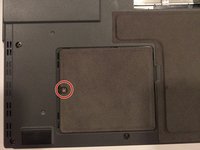
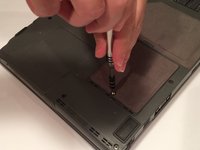
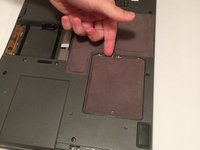
      • The RAM compartment will be located near the bottom-left corner of your lifebook. The compartment is behind the cover held in place by a 6 mm screw.

      • Using a Phillips #1 screwdriver, remove the 6 mm screw from the RAM compartment on the bottom-left corner of the rear cover.

      FixBotに聞いてみる

      コメントを追加

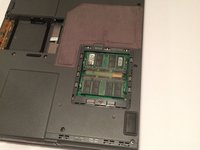
    2. Fujitsu Lifebook A6110 RAM Replacement: 手順 4、 3の画像 1 Fujitsu Lifebook A6110 RAM Replacement: 手順 4、 3の画像 2 Fujitsu Lifebook A6110 RAM Replacement: 手順 4、 3の画像 3
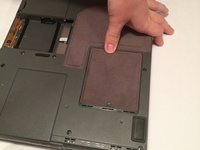
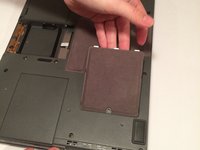
      • Slide the cover towards the screw, and then lift the cover upwards.

      FixBotに聞いてみる

      コメントを追加

    3. Fujitsu Lifebook A6110 RAM Replacement: 手順 5、 2の画像 1 Fujitsu Lifebook A6110 RAM Replacement: 手順 5、 2の画像 2
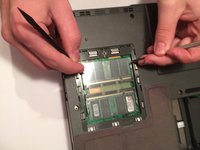
      • There are two RAM cards in this compartment. They look like small green plastic chips with black squares on each of them. These cards are beneath a thin plastic sheet that must be pulled out of the way.

      • Simultaneously pull each metal and plastic clip away from the center of the RAM stick.

      • If done correctly, the RAM card will eject at a 45 degree angle.

      FixBotに聞いてみる

      コメントを追加

    4. Fujitsu Lifebook A6110 RAM Replacement: 手順 6、 1の画像 1
      • Pull the RAM card out while maintaining the 45 degree angle it ejected at.

      • When reassembling, the gold pins on the RAM card must match the corresponding pins found on the motherboard.

      • If you choose to replace the other RAM card, repeat the process in Step 5.

      FixBotに聞いてみる

      コメントを追加

終わりに

To reassemble your device, follow these instructions in reverse order.

キャンセル: このガイドを終了できませんでした。

作成者

6人の作成者と共同で作成されました。

Cody Moniz

メンバー登録日: 10/19/16

422 ポイント

4のガイドは作成済み

チーム

UMass Dartmouth, Team 3-2, Isaacson Fall 2016 UMass Dartmouth, Team 3-2, Isaacson Fall 2016人のメンバー

UMASSD-ISAACSON-F16S3G2

3 メンバー

10のガイドは作成済み

0件のガイドコメント

コメントを追加

統計データ:

過去 24時間: 4

過去 7 日: 11

過去 30 日: 36

今までの合計 1,346