メインコンテンツにスキップ
リペアコミュニティに参加 - アカウントの作成

Framework Laptop 16 Fastener Guide

必要な工具と部品

  1. Framework Laptop 16 Fastener Guide, Fasteners information: 手順 1、 2の画像 1 Framework Laptop 16 Fastener Guide, Fasteners information: 手順 1、 2の画像 2
    • The Fastener Kit contains the following:

    • Grey screws labeled "M1.6 1.5mm fastener with a 5.5mm diameter 0.6mm thick T5 head"

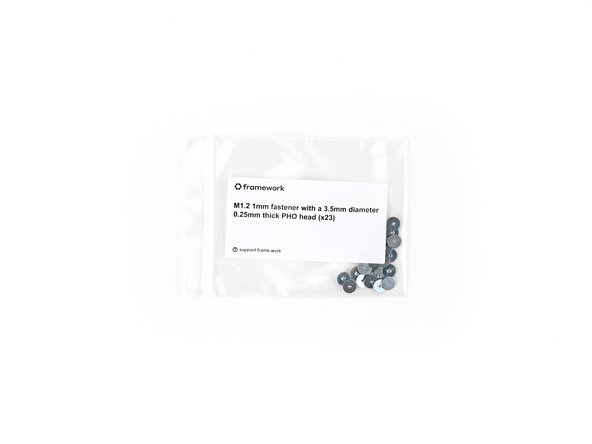
    • Silver screws labeled "M1.2 1.0mm fastener with a 3.5mm diameter 0.25mm thick PH0 head"

    • Grey screws labeled "M1.4 1.8mm fastener with a 4.0mm diameter 0.4mm thick PH0 head"

    • Gold screws labeled "M1.4 1.4mm fastener with a 4.5mm diameter 0.6mm thick T5 head"

    • Gold screws labeled "M2 3.0mm fastener with a 4.5mm diameter 0.7mm thick T5 head"

    • Black screws labeled "M2.5 3.5mm fastener with a 4.5mm diameter 0.5mm thick T5 head"

    • Your Framework Laptop comes with a spare screw of each size, attached to the chassis under the ventilation plate. You can use the Fastener Kit to replenish any screws you used there.

    FixBotに聞いてみる

    コメントを追加

  2. Framework Laptop 16 Fastener Guide: 手順 2、 1の画像 1
    • The Fastener Kit also comes with two additional sets of screws that aren't included with the spares:

    • Grey screws labeled "M2 2.6mm fastener with a 5.5mm diameter 0.8mm thick T5 head"

    • Grey screws labeled "M2 2.0mm fastener with a 4.5mm diameter 0.5mm thick T5 head"

    FixBotに聞いてみる

    コメントを追加

  3. Framework Laptop 16 Fastener Guide, Webcam and Mainboard screws: 手順 3、 3の画像 1 Framework Laptop 16 Fastener Guide, Webcam and Mainboard screws: 手順 3、 3の画像 2 Framework Laptop 16 Fastener Guide, Webcam and Mainboard screws: 手順 3、 3の画像 3
    • Use the grey screws labeled "M1.6 1.5mm fastener with a 5.5mm diameter 0.6mm thick T5 head" to secure the Webcam and Mainboard.

    FixBotに聞いてみる

    コメントを追加

  4. Framework Laptop 16 Fastener Guide, Input Connector Board and Input Module screws: 手順 4、 3の画像 1 Framework Laptop 16 Fastener Guide, Input Connector Board and Input Module screws: 手順 4、 3の画像 2 Framework Laptop 16 Fastener Guide, Input Connector Board and Input Module screws: 手順 4、 3の画像 3
    • Use the silver screws labeled "M1.2 1.0mm fastener with a 3.5mm diameter 0.25mm thick PH0 head" to secure the Input Connector Board and Input Module.

    FixBotに聞いてみる

    コメントを追加

  5. Framework Laptop 16 Fastener Guide, Fingerprint Reader and Touchpad screws: 手順 5、 3の画像 1 Framework Laptop 16 Fastener Guide, Fingerprint Reader and Touchpad screws: 手順 5、 3の画像 2 Framework Laptop 16 Fastener Guide, Fingerprint Reader and Touchpad screws: 手順 5、 3の画像 3
    • Use the grey screws labeled "M1.4 1.8mm fastener with a 4.0mm diameter 0.4mm thick PH0 head" to secure the Fingerprint Reader and the bottom of the Touchpad.

    FixBotに聞いてみる

    コメントを追加

  6. Framework Laptop 16 Fastener Guide, Storage screws: 手順 6、 3の画像 1 Framework Laptop 16 Fastener Guide, Storage screws: 手順 6、 3の画像 2 Framework Laptop 16 Fastener Guide, Storage screws: 手順 6、 3の画像 3
    • Use the gold screws labeled "M1.4 1.4mm fastener with a 4.5mm diameter 0.6mm thick T5 head" to secure the Primary and Secondary Storage.

    FixBotに聞いてみる

    コメントを追加

  7. Framework Laptop 16 Fastener Guide, Expansion Bay Shell screws: 手順 7、 3の画像 1 Framework Laptop 16 Fastener Guide, Expansion Bay Shell screws: 手順 7、 3の画像 2 Framework Laptop 16 Fastener Guide, Expansion Bay Shell screws: 手順 7、 3の画像 3
    • Use the gold screws labeled "M2 3.0mm fastener with a 4.5mm diameter 0.7mm thick T5 head" to secure the Expansion Bay Shell components.

    FixBotに聞いてみる

    コメントを追加

  8. Framework Laptop 16 Fastener Guide, Graphics Module screws: 手順 8、 3の画像 1 Framework Laptop 16 Fastener Guide, Graphics Module screws: 手順 8、 3の画像 2 Framework Laptop 16 Fastener Guide, Graphics Module screws: 手順 8、 3の画像 3
    • Use the gold screws labeled "M2 3.0mm fastener with a 4.5mm diameter 0.7mm thick T5 head" to secure the Graphics Module cover.

    FixBotに聞いてみる

    コメントを追加

  9. Framework Laptop 16 Fastener Guide, Hinge screws: 手順 9、 3の画像 1 Framework Laptop 16 Fastener Guide, Hinge screws: 手順 9、 3の画像 2 Framework Laptop 16 Fastener Guide, Hinge screws: 手順 9、 3の画像 3
    • Use the black screws labeled "M2.5 2.0mm fastener with a 4.5mm diameter 0.5mm thick T5 head" to secure the hinges to the bottom cover.

    FixBotに聞いてみる

    コメントを追加

  10. Framework Laptop 16 Fastener Guide, Bottom Cover screws: 手順 10、 2の画像 1 Framework Laptop 16 Fastener Guide, Bottom Cover screws: 手順 10、 2の画像 2
    • Use the grey screws labeled "M2 2.6mm fastener with a 5.5mm diameter 0.8mm thick T5 head" to secure the Bottom Cover screws.

    FixBotに聞いてみる

    コメントを追加

  11. Framework Laptop 16 Fastener Guide, Display screws: 手順 11、 2の画像 1 Framework Laptop 16 Fastener Guide, Display screws: 手順 11、 2の画像 2
    • Use the grey screws labeled "M2 2.0mm fastener with a 4.5mm diameter 0.5mm thick T5 head" to secure the display.

    FixBotに聞いてみる

    コメントを追加

終わりに

If you need help, contact Framework support.

キャンセル: このガイドを終了できませんでした。

Alex Diaz-Kokaisl

メンバー登録日: 01/16/22

241,444 ポイント

1,180のガイドは作成済み

0件のガイドコメント

コメントを追加

統計データ:

過去 24時間: 1

過去 7 日: 2

過去 30 日: 22

今までの合計 149