メインコンテンツにスキップ
リペアコミュニティに参加 - アカウントの作成

Flydigi Apex 5 Back Paddle Daughterboard Replacement

必要な工具と部品

  1. Flydigi Apex 5 Back Paddle Daughterboard Replacement, Back Paddle Daughterboard: 手順 1、 2の画像 1 Flydigi Apex 5 Back Paddle Daughterboard Replacement, Back Paddle Daughterboard: 手順 1、 2の画像 2
    • Orient the controller so that its back is facing you.

    • Apply firm downward pressure to remove both the M3 and M4 back paddles.

    FixBotに聞いてみる
  2. Flydigi Apex 5 Back Paddle Daughterboard Replacement: 手順 2、 3の画像 1 Flydigi Apex 5 Back Paddle Daughterboard Replacement: 手順 2、 3の画像 2 Flydigi Apex 5 Back Paddle Daughterboard Replacement: 手順 2、 3の画像 3
    • Turn the controller over so its front faces you.

    • Remove the D-pad by firmly pulling it away from the body of the controller.

    FixBotに聞いてみる
  3. Flydigi Apex 5 Back Paddle Daughterboard Replacement: 手順 3、 3の画像 1 Flydigi Apex 5 Back Paddle Daughterboard Replacement: 手順 3、 3の画像 2 Flydigi Apex 5 Back Paddle Daughterboard Replacement: 手順 3、 3の画像 3
    • Remove the clear, magnetically-adhered faceplate of the controller by firmly pulling it away from the body of the controller starting from the edge of the faceplate.

    FixBotに聞いてみる
  4. Flydigi Apex 5 Back Paddle Daughterboard Replacement: 手順 4、 3の画像 1 Flydigi Apex 5 Back Paddle Daughterboard Replacement: 手順 4、 3の画像 2 Flydigi Apex 5 Back Paddle Daughterboard Replacement: 手順 4、 3の画像 3
    • Remove the small cover from the rear of the controller by pushing it upward.

    • Unscrew the two 5.8mm screws behind the battery cover using a Phillips #0 screwdriver.

    FixBotに聞いてみる
  5. Flydigi Apex 5 Back Paddle Daughterboard Replacement: 手順 5、 2の画像 1 Flydigi Apex 5 Back Paddle Daughterboard Replacement: 手順 5、 2の画像 2
    • Turn the controller over so its front faces you.

    • Unscrew the six 10mm long screws from the front of the controller using a Torx T6 screwdriver.

    FixBotに聞いてみる
  6. Flydigi Apex 5 Back Paddle Daughterboard Replacement: 手順 6、 3の画像 1 Flydigi Apex 5 Back Paddle Daughterboard Replacement: 手順 6、 3の画像 2 Flydigi Apex 5 Back Paddle Daughterboard Replacement: 手順 6、 3の画像 3
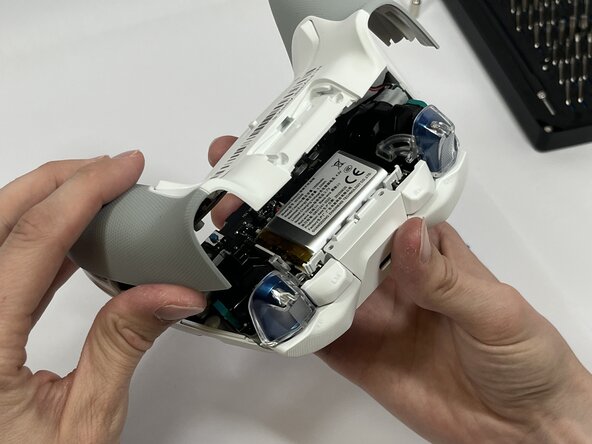
    • Insert the plastic opening tool between the top and bottom plastic controller molds, then pry until the two pieces separate.

    • Be careful not to fully separate the two pieces of the controller. There is a fragile ribbon cable connecting the two sides that must be carefully disconnected in the next step.

    FixBotに聞いてみる
  7. Flydigi Apex 5 Back Paddle Daughterboard Replacement: 手順 7、 3の画像 1 Flydigi Apex 5 Back Paddle Daughterboard Replacement: 手順 7、 3の画像 2 Flydigi Apex 5 Back Paddle Daughterboard Replacement: 手順 7、 3の画像 3
    • Carefully remove the back paddle ribbon cable with the angled tweezers or spudger.

    FixBotに聞いてみる
  8. Flydigi Apex 5 Back Paddle Daughterboard Replacement: 手順 8、 3の画像 1 Flydigi Apex 5 Back Paddle Daughterboard Replacement: 手順 8、 3の画像 2 Flydigi Apex 5 Back Paddle Daughterboard Replacement: 手順 8、 3の画像 3
    • Remove the four 5mm screws from the back paddle daughterboard with a Phillips #00 screwdriver.

    • Carefully lift the board to remove.

    FixBotに聞いてみる
終わりに

To reassemble your device, follow these instructions in reverse order.

作成者

2人の作成者と共同で作成されました。

Benjamin Tapp

メンバー登録日: 03/10/26

375 ポイント

2のガイドは作成済み

チーム

Idaho State University, Team 1-3, Watkins Spring 2026 Idaho State University, Team 1-3, Watkins Spring 2026人のメンバー

ISU-WATKINS-S26S1G3

4 メンバー

5のガイドは作成済み

0件のガイドコメント

コメントを追加

統計データ:

過去 24時間: 5

過去 7 日: 24

過去 30 日: 48

今までの合計 74