メインコンテンツにスキップ

Ematic Model FTABMP2 Case Replacement

必要な工具と部品

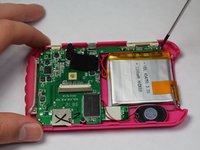
  1. Ematic Model FTABMP2 Case Replacement, Case: 手順 1、 2の画像 1 Ematic Model FTABMP2 Case Replacement, Case: 手順 1、 2の画像 2
    • Use a spudger to open your device's case, revealing the inside.

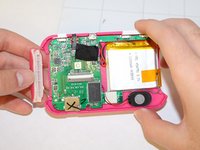
  2. Ematic Model FTABMP2 Case Replacement: 手順 2、 2の画像 1 Ematic Model FTABMP2 Case Replacement: 手順 2、 2の画像 2
    • Disconnect the LCD cable from the motherboard by pressing the two sides of the clamp together.

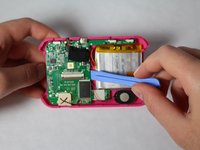
  3. Ematic Model FTABMP2 Case Replacement: 手順 3、 1の画像 1
    • Use the spudger to pry the LCD from the clamps that hold it in the case.

  4. Ematic Model FTABMP2 Case Replacement: 手順 4、 2の画像 1 Ematic Model FTABMP2 Case Replacement: 手順 4、 2の画像 2
    • If you need to remove the back part of the casing:

    • After disconnecting the LCD from the motherboard, remove the screws that hold down the motherboard.

    • Remove the plastic power and volume buttons.

    • Remove the two side grips of the device.

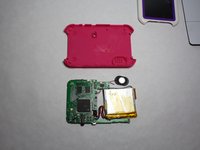
  5. Ematic Model FTABMP2 Case Replacement: 手順 5、 2の画像 1 Ematic Model FTABMP2 Case Replacement: 手順 5、 2の画像 2
    • Remove the motherboard, the speaker, and the battery, leaving just the back casing of the device.

終わりに

To reassemble your device, follow these instructions in reverse order.

作成者

5人の作成者と共同で作成されました。

Timothy

メンバー登録日: 01/21/15

505 ポイント

5のガイドは作成済み

チーム

USF Tampa, Team 9-2, Brown Winter 2015 USF Tampa, Team 9-2, Brown Winter 2015人のメンバー

USFT-BROWN-W15S9G2

5 メンバー

10のガイドは作成済み

0件のガイドコメント

コメントを追加

統計データ:

過去 24時間: 3

過去 7 日: 3

過去 30 日: 7

今までの合計 253