メインコンテンツにスキップ
リペアコミュニティに参加 - アカウントの作成

Dymo LabelManager 280 Keyboard Replacement

必要な工具と部品

  1. Dymo LabelManager 280 Keyboard Replacement, Rear Case: 手順 1、 2の画像 1 Dymo LabelManager 280 Keyboard Replacement, Rear Case: 手順 1、 2の画像 2
    • Remove battery.

    • Remove the label cassette.

    FixBotに聞いてみる

    コメントを追加

  2. Dymo LabelManager 280 Keyboard Replacement: 手順 2、 2の画像 1 Dymo LabelManager 280 Keyboard Replacement: 手順 2、 2の画像 2
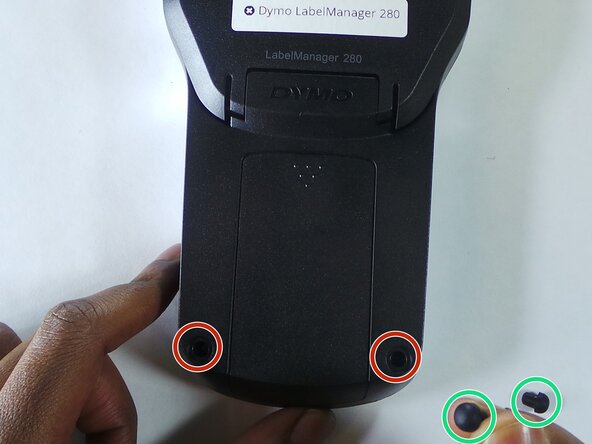
    • Remove the two rubber feets

    • Remove the 6 screws in the indicated places. These particular screws are 2mm x 8mm Phillips #0 head

    FixBotに聞いてみる

    コメントを追加

  3. Dymo LabelManager 280 Keyboard Replacement: 手順 3、 2の画像 1 Dymo LabelManager 280 Keyboard Replacement: 手順 3、 2の画像 2
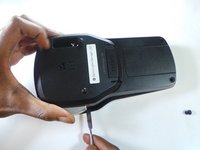
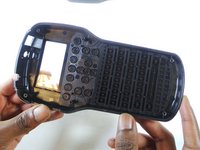
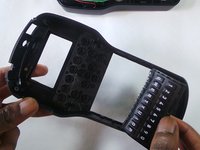
    • Use the spudger to take apart the device by insterting it as shown in the picture and twisting it. This should be done all around the device to ensure the two parts split correctly.

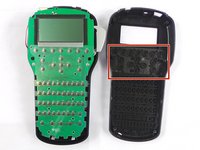
    • The keys/buttons highlighted in the second picture fall out easily so be careful. Keep device faced down in order to keep them from falling.

    FixBotに聞いてみる

    コメントを追加

  4. Dymo LabelManager 280 Keyboard Replacement, Keyboard: 手順 4、 2の画像 1 Dymo LabelManager 280 Keyboard Replacement, Keyboard: 手順 4、 2の画像 2
    • Remove the rubber keyboard.

    FixBotに聞いてみる

    コメントを追加

終わりに

To reassemble your device, follow these instructions in reverse order.

キャンセル: このガイドを終了できませんでした。

作成者

2人の作成者と共同で作成されました。

Steven Nguyen

メンバー登録日: 02/08/16

431 ポイント

3のガイドは作成済み

チーム

USF Tampa, Team 6-5, Eyestone Spring 2016 USF Tampa, Team 6-5, Eyestone Spring 2016人のメンバー

USFT-EYESTONE-S16S6G5

3 メンバー

4のガイドは作成済み

1件のガイドコメント

thank god the bottom feet are not glued in. and the tabs are not difficult

Edward Wijntuin - 返信 共有

コメントを追加

統計データ:

過去 24時間: 1

過去 7 日: 5

過去 30 日: 21

今までの合計 1,380