メインコンテンツにスキップ
リペアコミュニティに参加 - アカウントの作成

Disassembling Garmin Nuvi 370 Into Core Components

必要な工具と部品

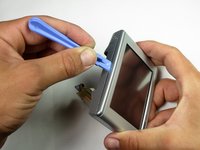
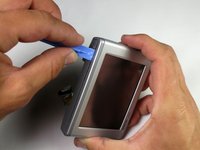
    1. Disassembling Garmin Nuvi 370 Into Core Components, Into Core Components: 手順 1、 2の画像 1 Disassembling Garmin Nuvi 370 Into Core Components, Into Core Components: 手順 1、 2の画像 2
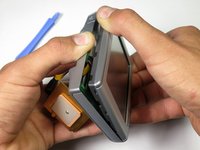
      • Unscrew the two screws on the antenna unit using a torc-head screwdriver.

      • The Torx-Head Screws' size is T-5, which is about 1.5mm.

      • Gently pry open the antenna unit with your fingers.

      • Be careful and try not to damage the small plastic tab.

      FixBotに聞いてみる

      コメントを追加

    2. Disassembling Garmin Nuvi 370 Into Core Components: 手順 2、 3の画像 1 Disassembling Garmin Nuvi 370 Into Core Components: 手順 2、 3の画像 2 Disassembling Garmin Nuvi 370 Into Core Components: 手順 2、 3の画像 3
      この手順で使用する道具:
      Tweezers
      $4.99
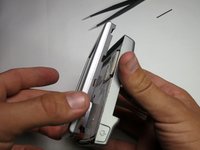
      • Slide out the inner casing attached to the antenna body.

      • Remove the rotating joint connecting the antenna casing to the main device:

      • Squeeze tweezers into the shown location and compress the spring.

      • Lift out the outer casing while keeping the spring compressed.

      • watch out, as the spring loaded portion may fly out unexpectedly.

      FixBotに聞いてみる

      コメントを追加

    3. Disassembling Garmin Nuvi 370 Into Core Components: 手順 3、 1の画像 1
      • Using a torx-head screwdriver, unscrew the two revealed screws that connect the front and back of the device.

      • The Torx-Head Screws' size is T-5, which is about 1.5mm.

      FixBotに聞いてみる

      コメントを追加

    4. Disassembling Garmin Nuvi 370 Into Core Components: 手順 4、 3の画像 1 Disassembling Garmin Nuvi 370 Into Core Components: 手順 4、 3の画像 2 Disassembling Garmin Nuvi 370 Into Core Components: 手順 4、 3の画像 3
      • Insert the plastic opening tool into the center of the edge as shown in first picture.

      • Slide the plastic opening tool along the central gap of device, making sure that each edge is free, as shown in the second picture.

      FixBotに聞いてみる

      コメントを追加

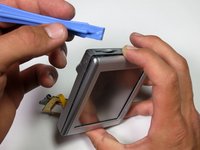
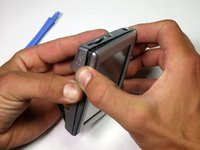
    5. Disassembling Garmin Nuvi 370 Into Core Components: 手順 5、 3の画像 1 Disassembling Garmin Nuvi 370 Into Core Components: 手順 5、 3の画像 2 Disassembling Garmin Nuvi 370 Into Core Components: 手順 5、 3の画像 3
      • Detach the front display from the back panel of the device.

      FixBotに聞いてみる

      コメントを追加

    6. Disassembling Garmin Nuvi 370 Into Core Components: 手順 6、 2の画像 1 Disassembling Garmin Nuvi 370 Into Core Components: 手順 6、 2の画像 2
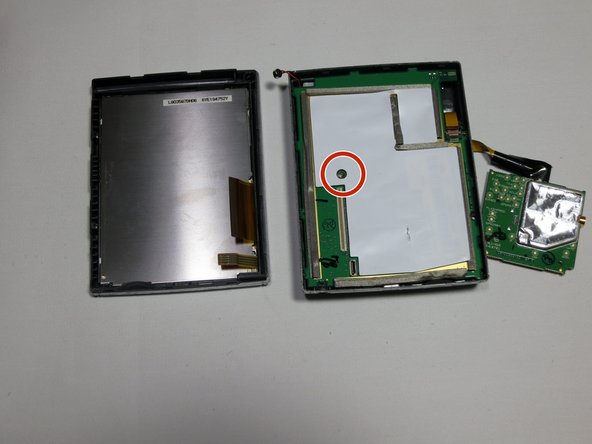
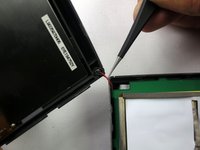
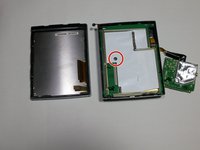
      • Using tweezers, gently lift the microphone from its resting position to fully separate the device into two parts.

      • Finally, remove the screw that connects the motherboard to the back casing with a 3mm head driver.

      FixBotに聞いてみる

      コメントを追加

終わりに

To reassemble your device, follow these instructions in reverse order.

キャンセル: このガイドを終了できませんでした。

2 の人々がこのガイドを完成させました。

作成者

7人の作成者と共同で作成されました。

Robert

メンバー登録日: 04/19/13

80 ポイント

1ガイドが承認済み

チーム

Cal Poly, Team 13-65, Johann Spring 2013 Cal Poly, Team 13-65, Johann Spring 2013人のメンバー

CPSU-JOHANN-S13S13G65

3 メンバー

36のガイドは作成済み

0件のガイドコメント

コメントを追加

統計データ:

過去 24時間: 2

過去 7 日: 10

過去 30 日: 43

今までの合計 1,848