メインコンテンツにスキップ
リペアコミュニティに参加 - アカウントの作成

Disassembling Flip Video USB Port

必要な工具と部品

  1. Disassembling Flip Video USB Port, Outer Shell: 手順 1、 2の画像 1 Disassembling Flip Video USB Port, Outer Shell: 手順 1、 2の画像 2
    • Turn off the device and take the batteries out.

    • Remove metal sticker under the LCD screen with a spudger.

    • This may require a large force to pry off the glued sticker.

    FixBotに聞いてみる

    コメントを追加

  2. Disassembling Flip Video USB Port: 手順 2、 1の画像 1
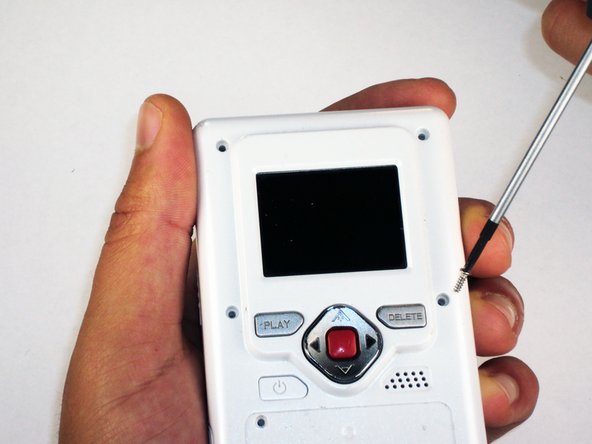
    • Remove the 4 gray screw caps with the spudger. These cover the screw heads and protect from dirt or grime.

    FixBotに聞いてみる

    コメントを追加

  3. Disassembling Flip Video USB Port: 手順 3、 2の画像 1 Disassembling Flip Video USB Port: 手順 3、 2の画像 2
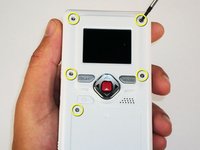
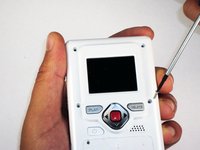
    • Remove the 5 10mm screws with the #00 Phillips screwdriver. These connect the back of the outer shell to the front of the outer shell.

    FixBotに聞いてみる

    コメントを追加

  4. Disassembling Flip Video USB Port: 手順 4、 1の画像 1
    • Open battery door. This can be done by gently depressing and sliding the battery down downward.

    FixBotに聞いてみる

    コメントを追加

  5. Disassembling Flip Video USB Port: 手順 5、 1の画像 1
    • Use the spudger to separate outer shells.

    • The spudger must be inserted between the shell halves to pry the edges apart.

    • Slowly work around the outside to separate the halves.

    FixBotに聞いてみる

    コメントを追加

  6. Disassembling Flip Video USB Port, Circuit Board: 手順 6、 1の画像 1
    • Remove the 3 5mm screws securing the circuit board to the front shell with the #00 Phillips screwdriver.

    FixBotに聞いてみる

    コメントを追加

  7. Disassembling Flip Video USB Port: 手順 7、 1の画像 1
    • Slowly lift the left side of the circuit board.

    • Do not attempt to remove the circuit board completely yet. It is still connected to the device.

    FixBotに聞いてみる

    コメントを追加

  8. Disassembling Flip Video USB Port: 手順 8、 1の画像 1
    • Disconnect the USB port cable from the back side of the circuit board.

    FixBotに聞いてみる

    コメントを追加

  9. Disassembling Flip Video USB Port: 手順 9、 1の画像 1
    • Slide out the battery contacts.

    • Battery contacts

    • Slot where battery contacts were located

    FixBotに聞いてみる

    コメントを追加

  10. Disassembling Flip Video USB Port, USB Port: 手順 10、 1の画像 1
    • Remove black 3mm screw that secures wire to outer shell with #00 Phillips screwdriver.

    FixBotに聞いてみる

    コメントを追加

  11. Disassembling Flip Video USB Port: 手順 11、 1の画像 1
    • Lift wire out of the outer shell slot.

    • The wire mount should stay attached to the wire.

    FixBotに聞いてみる

    コメントを追加

  12. Disassembling Flip Video USB Port: 手順 12、 1の画像 1
    この手順で使用する道具:
    Tweezers
    $4.99
    • Use tweezers to remove the spring that holds the port door shut.

    • Make sure the spring is firmly grasped by the tweezers so that it does not shoot off of the case.

    FixBotに聞いてみる

    コメントを追加

  13. Disassembling Flip Video USB Port: 手順 13、 1の画像 1
    • Remove the 3 screws securing USB port cover to the outer case with the #00 Phillips screwdriver.

    FixBotに聞いてみる

    コメントを追加

  14. Disassembling Flip Video USB Port: 手順 14、 1の画像 1
    • Remove the USB port cover.

    FixBotに聞いてみる

    コメントを追加

  15. Disassembling Flip Video USB Port: 手順 15、 1の画像 1
    • Remove the USB slider.

    FixBotに聞いてみる

    コメントを追加

  16. Disassembling Flip Video USB Port: 手順 16、 1の画像 1
    • Lift out the USB port slowly.

    • Since the hinge is spring loaded, be careful that no pieces fall out when the port is lifted.

    FixBotに聞いてみる

    コメントを追加

終わりに

To reassemble your device, follow these instructions in reverse order.

キャンセル: このガイドを終了できませんでした。

ある他の人がこのガイドを完成しました。

作成者

4人の作成者と共同で作成されました。

Elizabeth

メンバー登録日: 04/15/10

100 ポイント

6のガイドは作成済み

チーム

Cal Poly, Team 26-21, Regan Spring 2010 Cal Poly, Team 26-21, Regan Spring 2010人のメンバー

CPSU-REGAN-S10S26G21

4 メンバー

12のガイドは作成済み

0件のガイドコメント

コメントを追加

統計データ:

過去 24時間: 4

過去 7 日: 10

過去 30 日: 24

今までの合計 4,496