メインコンテンツにスキップ
リペアコミュニティに参加 - アカウントの作成

Dell XPS M1530 Wireless Card Replacement

必要な工具と部品

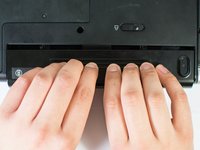
  1. Dell XPS M1530 Wireless Card Replacement, Battery: 手順 1、 1の画像 1
    • Turn the computer upside down with the battery facing you.

    • Turn the computer off and disconnect the charging cable from the computer.

    • Failure to unplug the charging cable may result in electric shock.

    FixBotに聞いてみる
  2. Dell XPS M1530 Wireless Card Replacement: 手順 2、 1の画像 1
    • Push the switch as far to the right as possible to unlock the battery.

    FixBotに聞いてみる
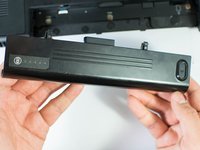
  3. Dell XPS M1530 Wireless Card Replacement: 手順 3、 2の画像 1 Dell XPS M1530 Wireless Card Replacement: 手順 3、 2の画像 2
    • Remove the battery using two hands and pull it away from the computer.

    FixBotに聞いてみる
  4. Dell XPS M1530 Wireless Card Replacement, Wireless Card: 手順 4、 1の画像 1
    • Unscrew the two 4.7mm Phillips #1 screws on the bottom panel of the laptop.

    • Two 4.7mm Philips #1 screws

    FixBotに聞いてみる
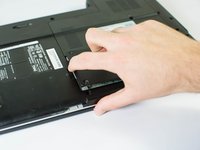
  5. Dell XPS M1530 Wireless Card Replacement: 手順 5、 2の画像 1 Dell XPS M1530 Wireless Card Replacement: 手順 5、 2の画像 2
    • Lift the panel up from the indented area.

    • This indent should provide enough grip to remove the panel with ease.

    FixBotに聞いてみる
  6. Dell XPS M1530 Wireless Card Replacement: 手順 6、 1の画像 1
    • Remove the single 3.9mm Phillips #1 screw in the upper right corner of the wireless card.

    • One 3.9mm Phillips #1 screw

    FixBotに聞いてみる
  7. Dell XPS M1530 Wireless Card Replacement: 手順 7、 1の画像 1
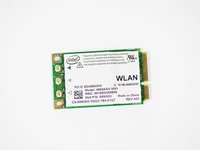
    • Lift the card out at an angle and carefully remove it.

    FixBotに聞いてみる
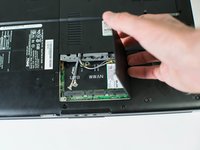
  8. Dell XPS M1530 Wireless Card Replacement: 手順 8、 2の画像 1 Dell XPS M1530 Wireless Card Replacement: 手順 8、 2の画像 2
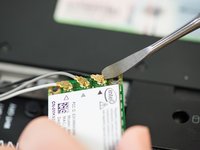
    • Use a spudger to carefully disconnect the antenna cables from the card by prying them straight up off the board.

    • It's best to use an ESD-safe tool, such as a nylon spudger, rather than the metal spudger shown in the photo.

    • Note the order of colors for the antenna cables indicated on the card.

    FixBotに聞いてみる
終わりに

To reassemble your device, follow these instructions in reverse order.

ある他の人がこのガイドを完成しました。

作成者

6人の作成者と共同で作成されました。

Jase Sasaki

メンバー登録日: 01/22/15

721 ポイント

5のガイドは作成済み

チーム

Cal Poly, Team 18-4, Maness Winter 2015 Cal Poly, Team 18-4, Maness Winter 2015人のメンバー

CPSU-MANESS-W15S18G4

4 メンバー

8のガイドは作成済み

0件のガイドコメント

コメントを追加

統計データ:

過去 24時間: 0

過去 7 日: 8

過去 30 日: 74

今までの合計 2,087