メインコンテンツにスキップ
リペアコミュニティに参加 - アカウントの作成

Dell XPS 18 Support Feet Replacement

必要な工具と部品

    1. Dell XPS 18 Support Feet Replacement, Back Cover: 手順 1、 1の画像 1
      • Turn the device on its screen.

      • Remove the ten 4mm screws using a T8 Torx screwdriver.

      FixBotに聞いてみる

      コメントを追加

    2. Dell XPS 18 Support Feet Replacement: 手順 2、 1の画像 1
      • Gently flip out support feet located near the bottom of device.

      FixBotに聞いてみる

      コメントを追加

    3. Dell XPS 18 Support Feet Replacement: 手順 3、 1の画像 1
      • Gently lift the back cover off the device. The back cover should come off easily.

      FixBotに聞いてみる

      コメントを追加

    1. Dell XPS 18 Support Feet Replacement, Support Feet: 手順 4、 1の画像 1
      • Fold down the support foot.

      FixBotに聞いてみる

      コメントを追加

    2. Dell XPS 18 Support Feet Replacement: 手順 5、 1の画像 1
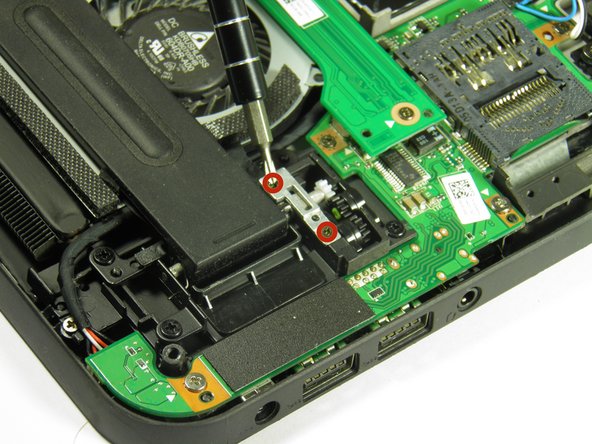
      • Remove the two silver 3mm screws with a Phillips 00 screwdriver.

      FixBotに聞いてみる

      コメントを追加

    3. Dell XPS 18 Support Feet Replacement: 手順 6、 1の画像 1
      • Remove the silver metal piece holding the support feet down.

      FixBotに聞いてみる

      コメントを追加

    4. Dell XPS 18 Support Feet Replacement: 手順 7、 1の画像 1
      • Remove the support foot.

      • Follow these same steps for the remaining support foot.

      FixBotに聞いてみる

      コメントを追加

終わりに

To reassemble your device, follow these instructions in reverse order.

キャンセル: このガイドを終了できませんでした。

作成者

4人の作成者と共同で作成されました。

Austin Weir

メンバー登録日: 01/31/15

1,308 ポイント

8のガイドは作成済み

チーム

Cal Poly, Team 6-29, Amido Winter 2015 Cal Poly, Team 6-29, Amido Winter 2015人のメンバー

CPSU-AMIDO-W15S6G29

4 メンバー

16のガイドは作成済み

0件のガイドコメント

コメントを追加

統計データ:

過去 24時間: 2

過去 7 日: 23

過去 30 日: 44

今までの合計 2,324