はじめに
If you want to upgrade your computer by putting in new RAM, or if you need to replace your RAM with new boards, use this guide to learn how to do it.
必要な工具と部品
-
-
Turn the computer over on its back so the battery compartment faces towards you.
-
Place your fingers on the small buttons with arrows pointing outwards.
-
Push and slide the buttons outward to unlock the battery compartment.
 FixBotに聞いてみる
-
-
-
Use a Phillips #0 screwdriver to unscrew the sixteen 0.6 mm screws on the back panel.
-
-
-
-
Pull up on the blue plastic tab connected by the white strip to unhook the keyboard panel from the motherboard.
-
-
-
Flip up the small locking flap on the keyboard cable ZIF socket and disconnect the keyboard ribbon cable.
-
-
-
Pull up on the wire tab with the blue, white, black, and red wires to detach the speakers from the motherboard.
-
-
-
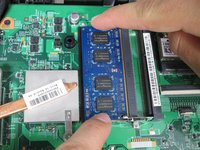
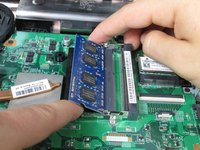
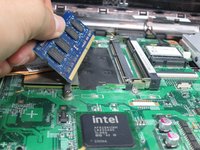
Place your fingers on the two metal tabs on the edges of the RAM.
-
Push on the tabs in the opposite direction.
-


To reassemble your device, follow these instructions in reverse order.
5 の人々がこのガイドを完成させました。

チーム

Cal Poly, Team 10-59, Amido Spring 2014 Cal Poly, Team 10-59, Amido Spring 2014人のメンバー
CPSU-AMIDO-S14S10G59
4 メンバー
5のガイドは作成済み
3件のガイドコメント
Looking at the Dell service manual. You dont need to remove any screws, but only the keyboard, and if your careful you dont need to remove the ribbon cable. Its all in the service manual you can download free from Dell.
swestonj is incorrect. The manual clearly states that you must remove the screws:
Removing the Keyboard
1. Follow the instructions in Before You Begin.
2. Remove the battery (see Removing the Battery).
3. Remove the two screws that secure the keyboard to the computer base.
etc.
зависит от целей. озу можно поменять не разбирая всё. а вот пзу придется все разобрать. я так и не понял сьёмный тут проц или припаян. вроде есть защелка
