メインコンテンツにスキップ
リペアコミュニティに参加 - アカウントの作成

Dell Dimension 4600 Sound Card Replacement

必要な工具と部品

  1. Dell Dimension 4600 Sound Card Replacement, Side Panel: 手順 1、 1の画像 1
    • Locate the case cover latch on the back of the computer.

    FixBotに聞いてみる
  2. Dell Dimension 4600 Sound Card Replacement: 手順 2、 1の画像 1
    • Using your index finger, slide and hold the cover latch down.

    • While holding the latch down, place your other hand flat on the side of the case and firmly shift the side panel to the left until it disengages.

    FixBotに聞いてみる
  3. Dell Dimension 4600 Sound Card Replacement: 手順 3、 1の画像 1
    • Grab the edge of the panel and slide it away from the case until it is removed.

    FixBotに聞いてみる
  4. Dell Dimension 4600 Sound Card Replacement, Sound Card: 手順 4、 1の画像 1
    この手順で使用する道具:
    Anti-Static Wrist Strap
    $7.95
    • Lay the computer flat on its side so that you are looking down on all of the components.

    • Very important at this point you connect your antistatic wrist strap to the chassis because the computer is no longer connected to ground at the power source. There is potential for static discharge which could destroy components.

    FixBotに聞いてみる
  5. Dell Dimension 4600 Sound Card Replacement: 手順 5、 1の画像 1
    • Locate the Sound Card and the screw attached to the Sound Card as shown in the picture.

    FixBotに聞いてみる
  6. Dell Dimension 4600 Sound Card Replacement: 手順 6、 1の画像 1
    • Remove the 8.9 mm screw by using a Phillips #2 screw-driver.

    FixBotに聞いてみる
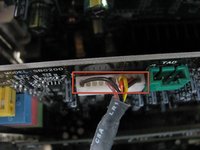
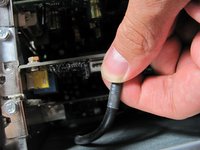
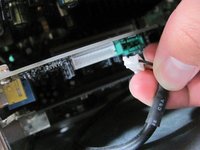
  7. Dell Dimension 4600 Sound Card Replacement: 手順 7、 3の画像 1 Dell Dimension 4600 Sound Card Replacement: 手順 7、 3の画像 2 Dell Dimension 4600 Sound Card Replacement: 手順 7、 3の画像 3
    • Locate and remove the white connector on the sound card by pulling on the black cable.

    FixBotに聞いてみる
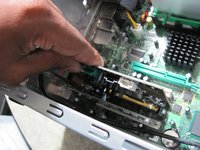
  8. Dell Dimension 4600 Sound Card Replacement: 手順 8、 2の画像 1 Dell Dimension 4600 Sound Card Replacement: 手順 8、 2の画像 2
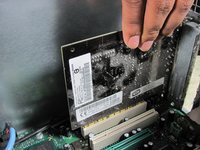
    • Grasp the Sound Card and pull it up and out of it's slot.

    FixBotに聞いてみる
終わりに

To reassemble your device, follow these instructions in reverse order.

6 の人々がこのガイドを完成させました。

作成者

5人の作成者と共同で作成されました。

Arvind

メンバー登録日: 10/12/11

395 ポイント

2のガイドは作成済み

チーム

Cal Poly, Team 6-10, Regan Fall 2011 Cal Poly, Team 6-10, Regan Fall 2011人のメンバー

CPSU-REGAN-F11S6G10

4 メンバー

11のガイドは作成済み

0件のガイドコメント

コメントを追加

統計データ:

過去 24時間: 0

過去 7 日: 7

過去 30 日: 45

今までの合計 5,710