メインコンテンツにスキップ
リペアコミュニティに参加 - アカウントの作成

Cisco 878 Integrated Services Router Top Cover Disassembly

必要な工具と部品

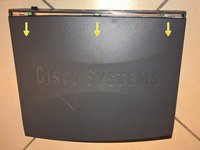
    1. Cisco 878 Integrated Services Router Top Cover Disassembly, Remove the two screws on back side: 手順 1、 3の画像 1 Cisco 878 Integrated Services Router Top Cover Disassembly, Remove the two screws on back side: 手順 1、 3の画像 2 Cisco 878 Integrated Services Router Top Cover Disassembly, Remove the two screws on back side: 手順 1、 3の画像 3
      • Only trained and qualified personnel should be allowed to install, replace, or service this equipment!

      • During this procedure, wear grounding wrist straps to avoid ESD damage to the card. Do not directly touch the backplane with your hand or any metal tool, or you could shock yourself!

      • Make sure that the power switch is turned to standby and that the power supply cable is disconnected. Disconnect all cables from the router back panel.

      • Use the Phillips #1 Screwdriver to remove the two screws on back side of the device.

      FixBotに聞いてみる

      コメントを追加

    2. Cisco 878 Integrated Services Router Top Cover Disassembly, Remove top cover: 手順 2、 3の画像 1 Cisco 878 Integrated Services Router Top Cover Disassembly, Remove top cover: 手順 2、 3の画像 2 Cisco 878 Integrated Services Router Top Cover Disassembly, Remove top cover: 手順 2、 3の画像 3
      • 1. Gently push the top cover of the router away from you.

      • 2. Lift it up top cover from the bottom of the router.

      • 3. Remove top cover from the device.

      • Place the router bottom on an antistatic mat.

      FixBotに聞いてみる

      コメントを追加

終わりに

To reassemble your device, follow these instructions in reverse order.

キャンセル: このガイドを終了できませんでした。

ある他の人がこのガイドを完成しました。

作成者

1人の作成者と共同作成されました。

Jiri Altman

メンバー登録日: 05/03/16

1,569 ポイント

9のガイドは作成済み

チーム

4k20 Repair Team 4k20 Repair Team人のメンバー

Community

2 メンバー

17のガイドは作成済み

0件のガイドコメント

コメントを追加

統計データ:

過去 24時間: 1

過去 7 日: 8

過去 30 日: 33

今までの合計 674