メインコンテンツにスキップ

Casio fx-82MS Button Replacement

必要な工具と部品

  1. Casio fx-82MS Button Replacement, Button: 手順 1、 2の画像 1 Casio fx-82MS Button Replacement, Button: 手順 1、 2の画像 2
    • This is the calculator in question.

    • The tools you will need are: a Phillips screwdriver, a spudger and a soldering iron.

    • If you don't have access to a solding iron, you need a stanley knife instead.

  2. Casio fx-82MS Button Replacement: 手順 2、 1の画像 1
    • Flip over the calculator.

    • Locate the 6 screws on the backside.

    • Remove all six screws.

  3. Casio fx-82MS Button Replacement: 手順 3、 1の画像 1
    • Once all six screws have been removed, take the back part off of the calculator.

  4. Casio fx-82MS Button Replacement: 手順 4、 2の画像 1 Casio fx-82MS Button Replacement: 手順 4、 2の画像 2
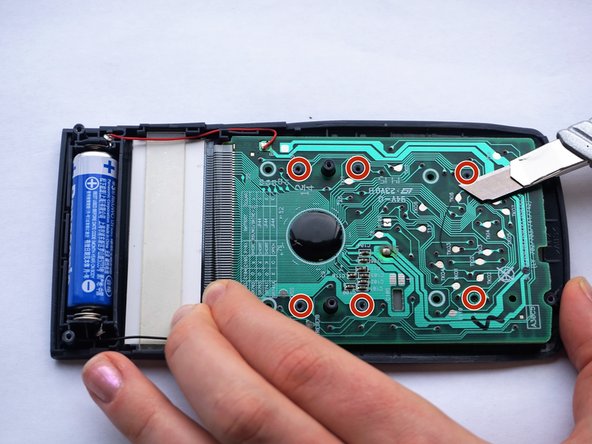
    • Locate the rubber contact points.

    • Solder the rubber contact points, while using the spudger to pry the PCB loose.

    • PCB stands for Printed Circuit Board.

    • Toxic gasses might be created. Hence, do this in a well ventilated room.

    • Start with the lower plugs (left on the photo). Gently pry the PCB loose at the same time.

    • For this step a third person is required for safety. One person uses the solder iron, the other one uses the spudger to pry the PCB loose.

    • If you don't have accessibility to a solder iron, use a utility knife to remove the plugs.

  5. Casio fx-82MS Button Replacement: 手順 5、 1の画像 1
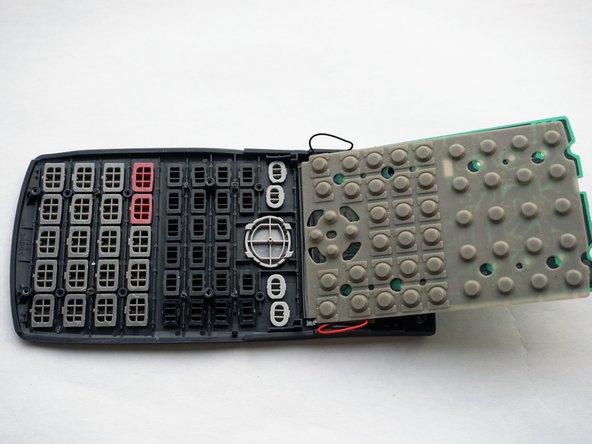
    • After having soldered away all six plugs, lift up the PCB.

    • Flip the board sideways as shown in the picture.

  6. Casio fx-82MS Button Replacement: 手順 6、 2の画像 1 Casio fx-82MS Button Replacement: 手順 6、 2の画像 2
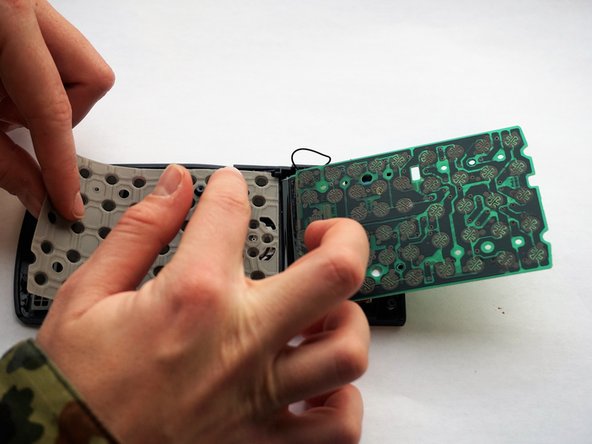
    • Remove the rubber mat.

    • Do this carefully, to make sure the buttons stay in their place.

  7. Casio fx-82MS Button Replacement: 手順 7、 2の画像 1 Casio fx-82MS Button Replacement: 手順 7、 2の画像 2
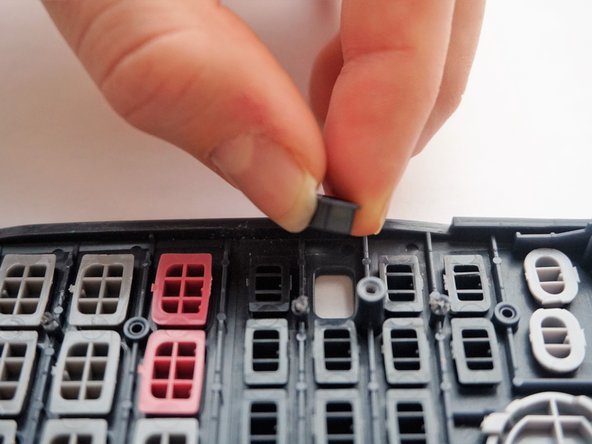
    • Replace the broken button.

  8. Casio fx-82MS Button Replacement: 手順 8、 2の画像 1 Casio fx-82MS Button Replacement: 手順 8、 2の画像 2
    • Put the rubber mat back in its place.

    • Make sure you push the six slightly damaged plugs through the rubber mat.

  9. Casio fx-82MS Button Replacement: 手順 9、 1の画像 1
    • Push the PCB back into place.

    • Again make sure you push the slightly damaged plugs through the PCB, to make everything fits perfectly again.

  10. Casio fx-82MS Button Replacement: 手順 10、 1の画像 1
    • Place the back side of the casing back on top of the front.

  11. Casio fx-82MS Button Replacement: 手順 11、 1の画像 1
    • Put all six screws back in the back side of the casing.

ゴール

2 の人々がこのガイドを完成させました。

作成者

4人の作成者と共同で作成されました。

Rebecca Dowling

メンバー登録日: 12/05/16

107 ポイント

1ガイドが承認済み

チーム

Delft University of Technology, Team 1-6, Flipsen Fall 2016 Delft University of Technology, Team 1-6, Flipsen Fall 2016人のメンバー

TUD-FLIPSEN-F16S1G6

3 メンバー

2のガイドは作成済み

0件のガイドコメント

コメントを追加

統計データ:

過去 24時間: 3

過去 7 日: 9

過去 30 日: 41

今までの合計 3,720